
Add automatic texture
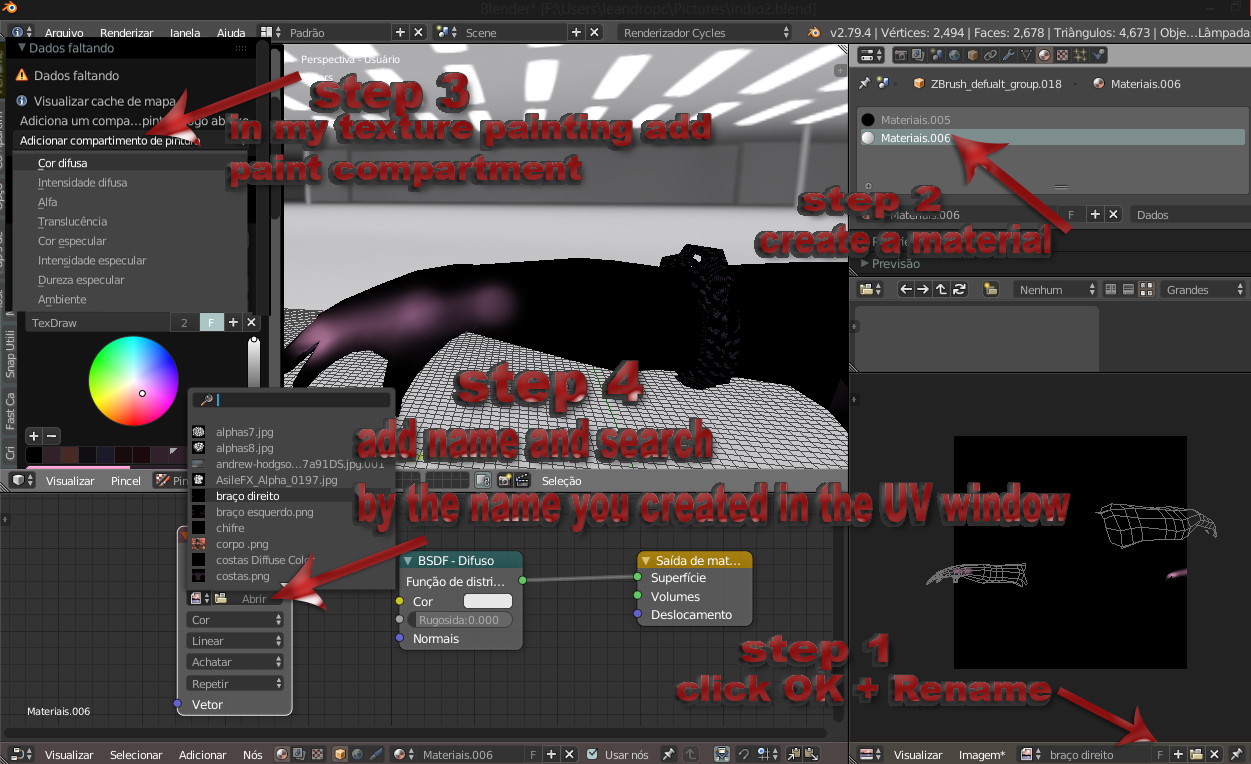
There are two ways to add texture image the longest way it would be (according to the Print of the image) on the UV screen I create and rename - then I have to create a material-- then I change to texture painting mode and add a diffuse color painting compartment then on the nood tab i add a nood image type i look for the image i created in the uv window and i call the diffuse ---
Or the shortest way it would be ------ add a cube - switch to texture painting mode - and add paint bucket - it creates the material and preferably rename it --- plus it creates the material no more rename it with the name you renamed in the Texture tab - and you have to add the node manually and look for the image that you renamed and linked in the diffuse and if you have the UV tab open you have to also search the image and add manually to visualize ---- that could be all altomatico - clicking on Add painting space it creates the already renamed matter and creates the nodes type image with the image selected and linked in the diffuse and the UV tab it already updates to image you created
1 Comment
This has been the first hardest concepts I've had to learn in any 3D software. Would be great to automize this step - texture painting.. should just work as soon as you activate it. Or else it feels broken. Even years later, sometimes I miss a step and it still feels broken.