
ORBIT around CURSOR
I'd love to see this implemented. Such a time saver in complex geo. Alternatively, a point and orbit like in 3DS Max-
I'd love to see this implemented. Such a time saver in complex geo. Alternatively, a point and orbit like in 3DS Max-
20 Comments
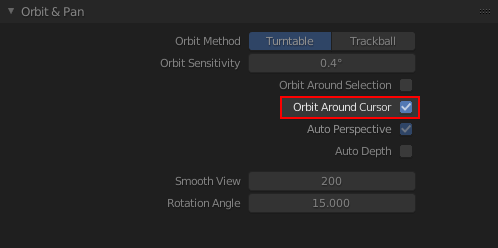
<b>Orbit Around Cursor</b> is already implemented. It is called "Auto Depth" in Blender and is shown in the screenshot you provided. And it functions exactly like the 3D Max gif that @IIIFGIII posted.
<b>Orbit around 3D Cursor</b> is also implemented. It is in the 3D Viewport's 'N" menu ► View Tab ► View Lock ► Lock to 3D Cursor
<b>ALT+MMB</b> is another handy Navigation method. It sets the viewport's target to what ever you clicked on.
If none of this is your solution then I suggest creating a new and more detailed proposal.
please use Auto Depth
* @Roman * exactly. now, adding that to the cursor is what i'm talking about. when setting the cursor on a face, it would keep that point
Isn't that pretty much the default in Blender?! (As long as you have "Orbit around Selection" unchecked.
* @michael * not even close. the default setting is something i do not understand due to the fact there's not fixing point. i'd not create this thread otherwise
* @dniitall * well... as * @Roman * showed it does work. I just forgot that Auto Depth wasn't on by default.
need more details.. are you talking about the 3D cursor or the mouse cursor?
* @testure * "a point and orbit like in 3DS Max" around mouse cursor.
* @testure * i'm talking about place the cursor on a face and orbit around it. i think it's more effective and accurate to use the cursor as an orbit point, then a whole selected object.
* @IIIFGIII * thank you for the gif. easier to explain with a pic.
* @dniitall * I still don't understand, this is exactly how oribit works when you don't have "Orbit around Selection" enabled. How is this different?
As a side note, "Like it works in 3dsmax" isn't useful to people who don't use 3dsmax (or have not used it in many years, like myself)
Comment bellow...
The panning and mouse dragging/movement in perspective view could be better. It has the annoying ability to speed up or slow down the mouse movement based on random things like distance to pivot, focal length, modifiers and some other unknown things.
this is something not everyone will understand until they try it. therefore, writing something like "this is exactly like..." without any experience is just confusing.
* @dniitall * I find this comment ironic considering you're using 3dsmax to demonstrate the feature you want without actually explaining it. So your solution is we should all go buy 3dsmax and "try it" and then come back and upvote your proposal once we understand? Bit of a stretch, don't you think?
* @testure * I'm not a Max user but I get what he says by "making it faster". It would be mercifull to have this option working right away -> (Lock to 3D cursor or autodepth just like they show it - instant) but why on Earth Blender still has Lock to 3D working only by activating it in the view tab... and Autodepth only in properties panel also... :/ When you want to change types of views more frequently and you're using many tabs like: an item tab, some addons tabs etc. you have to switch constantly between them just to change a simple type of view. ??? Its a pain in the butt. For that feature? 2.80 and still this thing's like in the bronze age ;( It would be better to have it at hand, fast like panning and rotating . Something intuitive what you just do automatically and not like something that is forcing you to think about something else than your current task. :) Maybe if its not possible -> to make fast shortcuts for Lock to 3D cursor view and autotepth -> it could be at least switchable in the view pie menu ( ` menu )? :D. And by the way if we're talking about view pie menu:) :It would upgrade Blender workflow with Lock Camera to view and an option of making new camera snapped to current view in the same pie menu. :) Something like on example bellow but maybe with larger icons: :){attachment Lock_to_3D_cursor_viewPNG}
* @testure * i'm sorry if i wasn't clear enough. i'm not very good at explaining my self. i have an idea and i try to push it out there.
select the object and do "frame select"
That's two extra steps instead of one direct action.
* @-L0Lock- * that's just one extra step. in Max, it's implemented and therefore no extra steps. having that said, this is an extra step i'd gladly take because it's extremely time saving