
Backface Cull select invisible front faces
what is the sense if we turn on backface cull and blender still select the invisible faces as shown in the image. I enable backface cull so that we can work on behind objects that are hidden by wall.
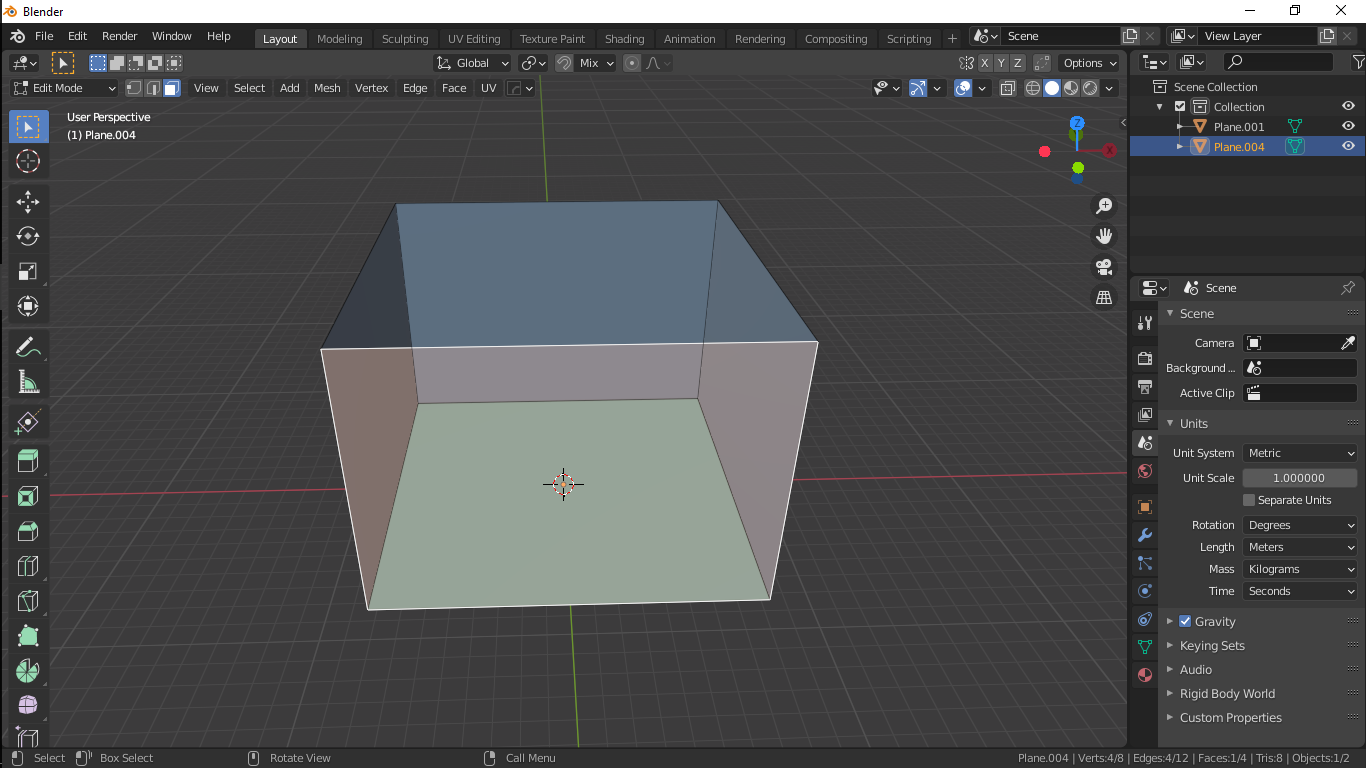
what is the sense if we turn on backface cull and blender still select the invisible faces as shown in the image. I enable backface cull so that we can work on behind objects that are hidden by wall.
6 Comments
I encountered the same problem in the topology model. Now I use displacement and cancel x-ray to hide the backsurface.Hope there can be a better solution. I use google translate ...sorry.
I also hope that this opinion can be seen, because in the topological model, the dots, lines and surfaces on the back are also selected, which makes the work very difficult. This is actually similar to the " ignore backfacing " function of 3Dmax.
i.imgur.com/srdjk6q.png
It actually works like that in Object Mode, but kind of useless in Edit Mode, you can easily use H key hide face though
* @PTCreative * you dont use backface cull thats why answering like that. First figure out why it is used and benefit of it.
* @mrajendra2150 * I think you mis-understood. I said it wasn't useful in edit mode, agreeing because of the reasons you mentioned. In fact I do use it for interiors but the work around has been to hide faces.