
Option to allow AO calculations to ignore transparent shaders
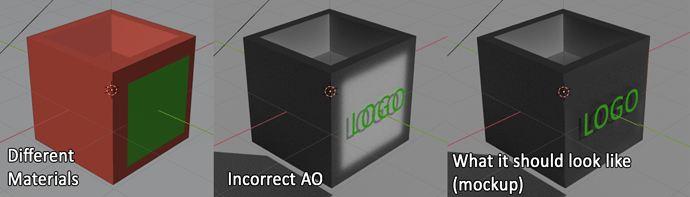
In the example image there are 2 meshes, a box with an AO input which mixes between 2 colors, and a plane with an image texture determining it's alpha. I know I could achieve this other ways, but I am setting this up as an example to demonstrate the issue.
The issue is that even though most of the plane with the "Logo," text on it is transparent, the box still calculates that as "Occluded," and therefore leaves a white outline behind the text. There is currently no way to fix this.
It would be nice if there was an option to take transparent shaders into account when doing the AO calculations, and alter the intensity of the occlusion based on the transparency of the shader it's interacting with.
On a technical level, I understand that AO is calculated usually based on the Z depth, as well as the surface normal, and neither of these take transparency into account; However, we also have the mist pass, and the denoising normals which serve virtually the same function and do take transparency into account. If we could use these same calculations to calculate AO it might allow us to circumvent this problem (a toggle might still be needed in case this causes other edge case problems though).
3 Comments
Please bring this forward in the next release! This is especially useful when scattering leaves (planes with alpha texture) on the ground, since currently the ground material would detect the whole plane in AO instead of the leaf alpha itself.
I know it's off topic but if you want to mix color data, you should use things like mix nodes in a single shader, not use multiple shader.
* @-L0Lock- * The difference are both color and reflectivity so it's easier for me to use shaders.