
Bone constraints "SELF" target tickbox, so that we dont have to use an eyedropper every time we make a constraint
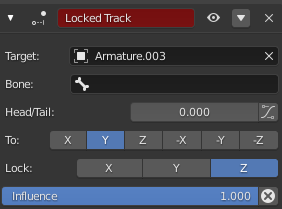
So, I've been making a rig that involves a lot of pistons and small bits that all use a bunch of constraints within one armature. The constraint system is nice overall, but having to use the eyedropper EVERY GOSH DARNED TIME I make a constraint feels really unnecessary. Surely there could be a tickbox right next to the "target:" field that would just say "self" and select the armature that the bone is in. An option in the preferences to make that a default thing would also be supa nice. Surely not a hard thing to implement, right?
Also eyedropper for bones, and not just target object? It is nice for forcing me into good naming conventions, but come on.
2 Comments
Instead of adding checkboxes everywhere (there are lots of places where you could put one for this purpose), i'd rather like a form of wildcard using Blender's Simple Epressions , you can write in any object selection field to point to the object whearing it. I.E. if we could write
#selfand it would automatically "translate" into the wearing object. The same way as when we write#framein a value field it creates a driver on that field outputing the current play frame.If you are working with a single armature you could just hover over the target and press ctrl + v (you need to copy the name of the armature first of course) which in that case would be as fast as ticking a self checkbox.