
Add 'CAD style' inset-based rounding for bevels
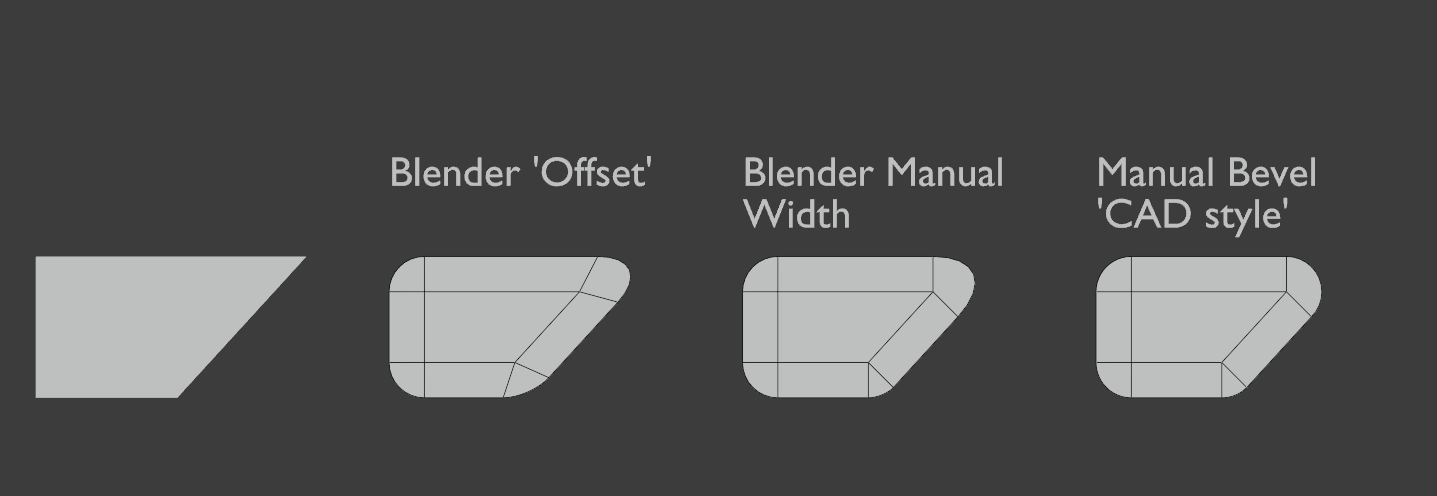
Blender's bevel is fine right now, but lacks some tools required to do certain precise shapes. One thing i have often noticed but never nailed down is that blenders bevel width and corner creation isn't quite right for a large amount of situations. I did some research and found out that the 'correct' way to do this is what many CAD programs use. In the attached image, you can see three bevel methods.
The left is blender's default bevel mode without any changes. You'll notice that the top right bevel seems too small, and the bottom right bevel feels a bit too large.
In the middle image, I have used the inset to generate the angles along each normal, and used that to get a consistent width across each of the bevels. This looks fine but the top right bevel seems a little strange.
In the right most image, I have manually created each of the bevels using the spin tool around each vertex. each of the widths and angles are consistent to the angle of each edge. You can find a more detailed diagram of some of the different bevel methods here .
**If blender were to add an additional 'inset' bevel mode with consistent profiles and widths, it would make many of the more precise hard-surface setups much easier**.
8 Comments
My vote for any CAD improvements/features for Blender.
constant radius is being worked work: developer.blender.org/D6386
* @Pawel Piotrowski * Yeah, I just have to find the time and the energy to finish that patch. It's sort of a difficult problem in the general 3D case, and there are so many other more straight-foward things to work on..
Would also be nice if bevel didnt inflate the object in 2D mode, would make it more consistent with the bevel behaviour in meshes. Also it would save a tedious extra step when adjusting bevel depths on curve objects.
This looks like a duplicate of blender.community/c/rightclickselect/D4dbbc/
Old devtalk thread about this: devtalk.blender.org/t/fall-2019-bevel-constant-radius-project/9872
Possible (on 2D planes only) with the Fillet Edges tool in the Mesh Tools Plugin: blender-addons.org/mesh-tools-addon/
This definitely needs to be added though, and arguably the default...
A key feature for hard-surface workflows! The only way to achieve these right now is very time-consuming.