
Exporting Child from Bone have origin position values at the base of the bone, but not the tail end
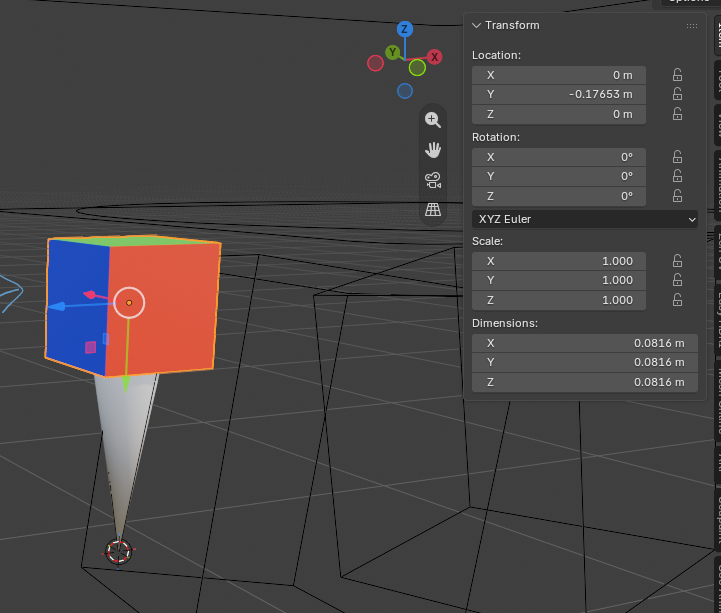
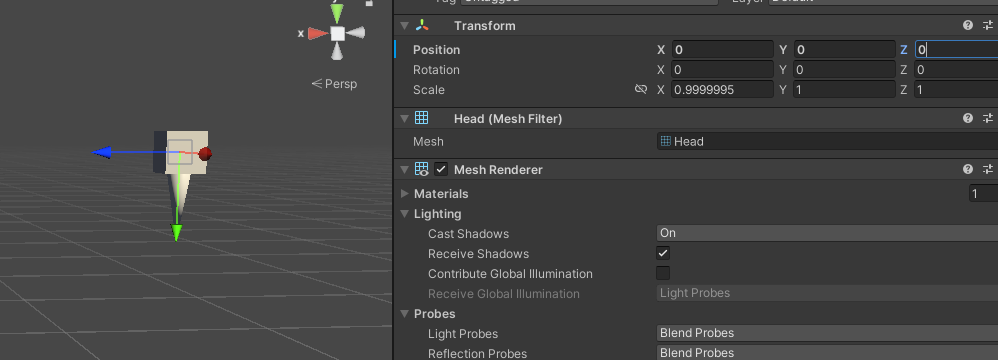
I notice when parenting a child to the bone, I'm used to Maya/Unity's bone transform logic is set at the base of the bone. However in Blender, it's at the tail end. So the value might be zero-positioning in Blender, but not when you export it to other softwares like Unity.
In the screenshot, the box represents a gun holster. I've to give it an offset up a little from the tail being the pivot center in Blender so that in Unity, it's perfect zero-positioning.
This is a programming ethnic if they want to do any spawning or de-parenting things in realtime. But also as an animator, it would also help to animate without the offset in Blender to compensate it.
4 Comments
In Blender 5.2 you can choose if an object parented to a bone follows the head or the tail of the bone. That is under "Object Properties" -> Relations -> "Head/Tail"
Assuming that is what you meant.
That's what I wish for yes. But gets ignored during export for game-dev. If you set it to Head, during export, it is still placed at the tail end :(
However this would be an amazing solution if it works.
that sounds like a bug with the exporter that doesn't respect this new feature. Can you report that?
projects.blender.org/blender/blender/issues/162158 Yup!! Here’s the link to the bug report! 🙏