← All ideas
24 Aug 2021
mahdi
Open
Shading and Textures
User Interface
mahdi
Branskugel
Draise
ManBlender
Midalax
Nevil
Shimoon
Vik
Zawardo
ainex.nikita
alex123
alexavilkacgiart
alexisb38
bestelix
fasoric.vj
ivek.burek
lacina.vojtech
mblender
nekketsukyoujin
renggli
roger.menzi.schweiz
sombrero76
sqeee
tc8
tom12

8 Comments
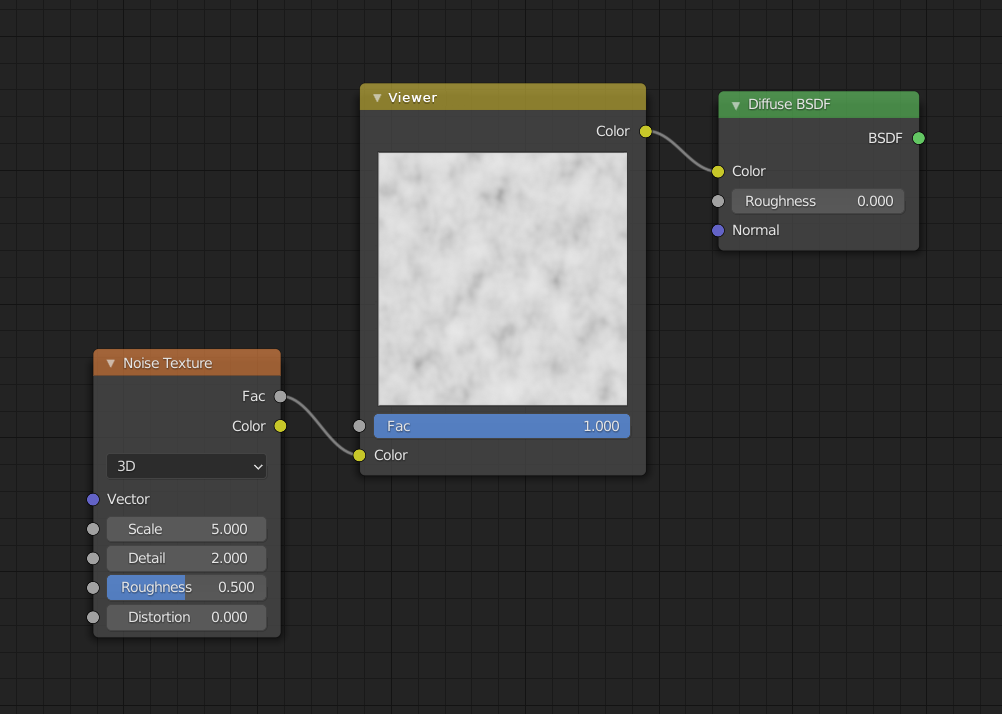
I quite like the way that substance designer handles this. You can click on any node in your tree to see its output as though it were the final node in the tree. Would be nice to see this feature in blender too.
How would you handle texture coordinates ? forcing a UV plane (which is what I suppose your illustration represents) doesn't make a lot of sense for any object or worldspace based textures. This is the strength of the node wrangler shortcut, it displays the state of the node tree at any point on your actual mesh. The downside that I see to the node wrangler workflow is that you have to remember to reconnect your final node to the material output once you are done tweaking it.
I see what you are saying but like other tools in blender people would just have to learn the limitations of it. Perhaps the viewer could support different previews too such as a sphere or a simple volume for quick testing.
There is addon, but not free
blenderartists.org/t/node-preview-rendered-thumbnails-for-shader-nodes/1298187
I understand what you want, and i agree with it, but it should be a window inside every node, imagine adding this to every other node in the tree, for every material.
We do not need to put a Viewer for each node. Sometimes we want to see what the combination of several nodes looks like and it may not be possible to see it on Viewport (with node wrangler).
What I'm saying is that it's time that every node in Blender has a viewer window on it, for textures, color corrections etc., like every other 3d software. Basically what The Node preview add-on does, but implemented in Blender.
Download node preview addon, it shows each node preview at the top of the node.