
Blender 2.8 - Keyboard Shortcut Reference Popover in Help Menu
Hi Everyone,
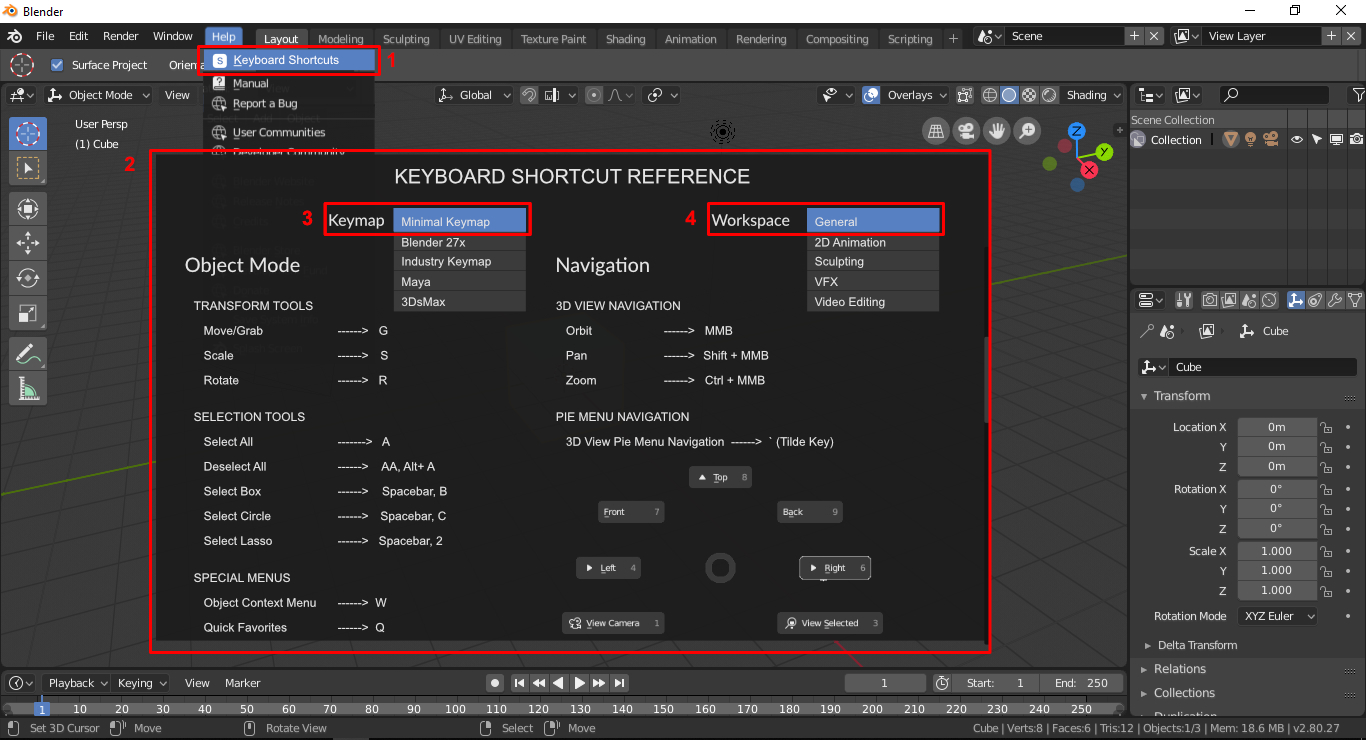
In Blender 2.8 there are many shortcuts have changed, some removed. So, I'm here to propose a keyboard shortcut reference popover in the help menu. That would be helpful for the existing users to know which shortcuts have changed. and also for new users will learn the shortcuts from the popover. If the shortcut reference UI has a keyboard "shortcut key" that would be really helpful to every blender users.
Thank You :)
Here is my Idea in a visual format.
9 Comments
I am newbie and this is very good idea!
belay that last comment. You indeed do have exactly what we are looking for, on to that missing cuppa have ( coffee that is) !
The problem is the the newbie enters blender form a different perspective. They know what function they want but do not know the shortcut key for it . Is your menu searchable BY THE FUNCTION it serves " Thats what a lot of us need to get started.Thanks
It would have to be sensitive to current config also, not just hard coded => It will take a while to get it right!
This would be great also if context sensitive based on currently active mode.
whats the difference with the old , more complete one ?
@dodododorian: Easier to understand and more a reference than an editor.
@ondraise15: How would you decide what goes in this versus what's in the editor?
Why not spend the effort instead to improve the editor so it's easier to understand and work with?
@Jason van Gumster: I tend to agree, redoing the entire editor so it's a keyboard layout with drag and drop assignment and function feedback would make more sense - as been discussed in these forums; this is just a quick fix for hotkey overviews of how the software works.