
Reimplement and reinvent bump node.
Looks like Bump never worked well since 2.79 and may be earlier. It produces sharp seams even with concave surfaces.
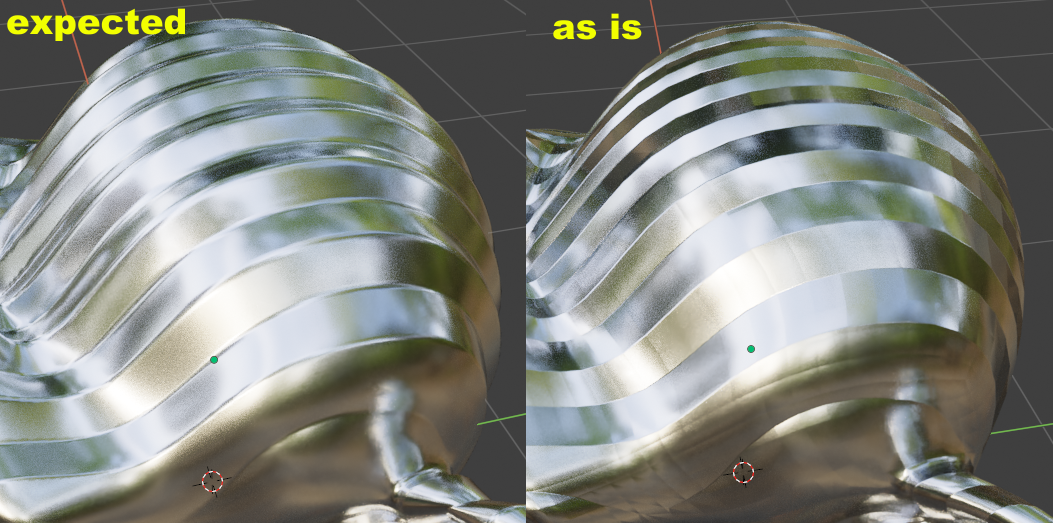
So if you have any ideas, skill, papers in this area, please post it here.
Looks like Bump never worked well since 2.79 and may be earlier. It produces sharp seams even with concave surfaces.
So if you have any ideas, skill, papers in this area, please post it here.
6 Comments
Are you sure aren't putting a color node into it? Because you need to change the mode from sRGB to Non-Color. That's about what it looks like if you use sRGB rather than Non-Color, so just wanted to be sure.
You posted a bug report about it on the bug tracker, which was then confirmed as a legit bug. And a year after that you then posted here - a website for features proposals, and another year later you come back to post the bug reports.
You know it's a bug, the devs know it's a bug. All what's needed now is the devs to get to work on it. So, what is the meaning of posting here? If any discussion about how to fix this needs to happen, I highly suspect it should happen there : developer.blender.org/T74979
Firstly because RCS is for feature proposals, not really for "how to fix a known bug", and because making some constructive activity on the tracker might bring more dev attention to it, and if the discussion even finds out how to fix the bug: it will make the devs' life easier, and the chances of this ticket to be fixed and closed higher.
Isn't that just bit depth limitation?
I'm almost certain it's using a node in sRGB format instead of switching it to Non-Color. I made the same mistake recently and thought the viewport/Eevee was just being dumb because Cycles rendered it ok. Then later I realized my mistake. I was adding a nice smooth wave kind of bump to geometry, and had normal issues between every face just like that.
No, in this case i use procedural wave texture.