
Image Editor (Paint) - Real time light reactive Material Preview in 2D
IDEA
Just like we have the Material Preview (Viewport Shading) in the 3D View that allows to preview the full material (all maps combined) of the mesh reacting to environment light, we could preview the same synchronized light reactive full material but on the mesh's unwrapped 2D (in the Image Editor), for better visualisation when painting.
This is the desired effect:

IMPLEMENTATION
Instead of showing only one map at the time, we display one "map" containing all the information of all the maps of the material combined.
On top of that, we add the light information received by every texel (I guess) of the object from the viewport and transpose it to the mesh's UVs coordinates as an overlay. If we rotate the environment, the lighting moves in real time on the UVs as well.
Note that if the UVs of a mesh are not properly packed, the ligthing would be limited to the inside UVs only. UVs that are outside don't get "lighted".
USER INTERFACE
This is how it could be integrated in Blender's UI:
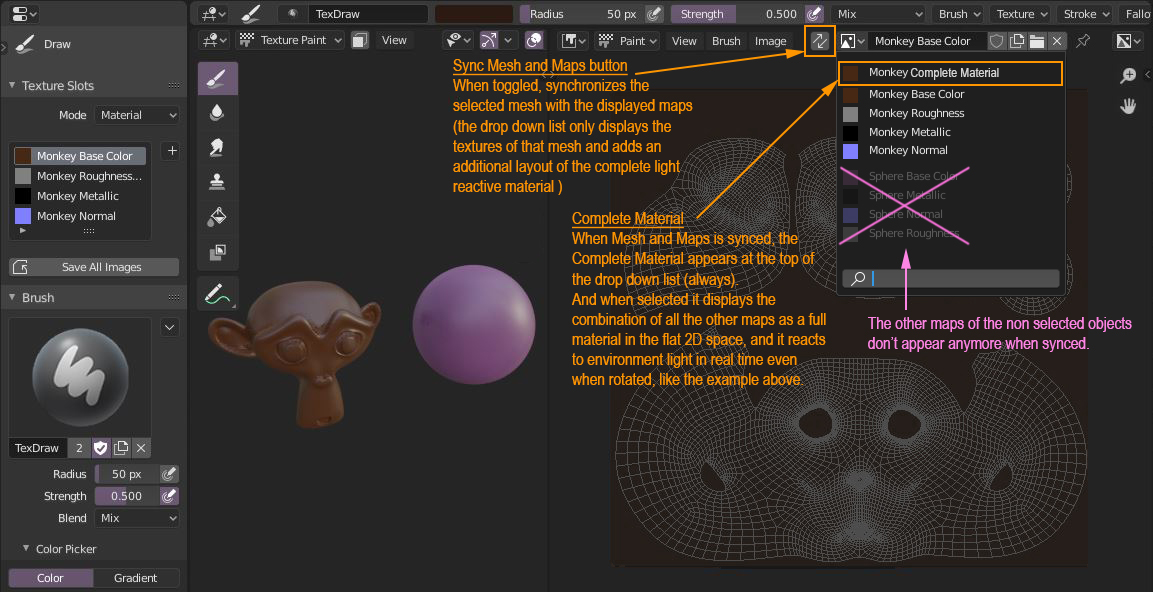
4 Comments
Nice proposal! I'm just not sure why this is something you want. What is the purpose of the feature?
* @Josephbburg * Substance Painter has set an industry standard workflow for painting AAA quality meshes in a very efficient manner by allowing us to paint on multiple channels simultaneously. And I want Blender to improve its painting workflow by going in that direction. I believe switching softwares for specialized tasks is not a good practice. I want the entire pipeline to create assets to be in Blender.
Currently, we can only paint channels one by one. Fortunately, the Layer Painter addon is trying to bridge this gap, so I'm relying on it.
This feature proposed here might not make sense to you now, but it's part of a bigger picture: bring Blender closer to that industry standard workflow.
It is useful nonetheless, because if we had the possibility to paint on multiple layers simultaneously from a premade material on the 2D space, this full light reactive material preview is the best previsualisation mode you would need when painting on it. It removes the need to constantly switch between single channels as you can see the final result already.
* @Ryxx * Your proposal isn't about painting on multiple layers simultaneously, though. You don't have to convince me on that point, I agree with you.
I just don't agree with this. That's what the 3D view does. Why is it needed in the image pane? I want to see the channels so I can see what I'm doing.
* @Josephbburg * When I talk of multiple layers painting I'm just explaining the context that spawned the idea.
I need it in the Image Editor because sometimes you paint on the mesh, sometimes on the image. And I want them synchronized. And I never said to remove single channels, they are still there in the proposal. In fact, I think when you work on a single channel, you should see that single channel on the mesh as well. At least have the option to synchronize.