
Stop-Motion Animated Switching Objects + Individual Object Timeline?

Hello All,
First I must mention that there are probably many alternative solutions to do this, BUT! The reason I suggest this feature is to have an easier, user-friendly solution in the future of Blender:
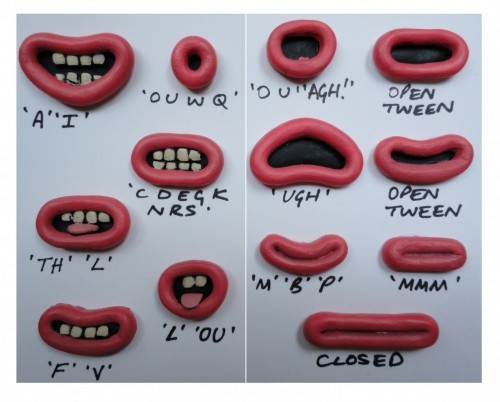
The idea is to have a Library of many different objects that may or may be created from different amount of faces or pieces of mini-objects (inside Edit Mode) different materials or anything that individual Object can have and SWITCH them as Scrollable Animating option.
As a 2D Animator the solution is usually to have an extra Timeline for EACH object, so you can switch frames while you are on the MAIN Timeline.
I'm not exactly sure how to translate it to a Blender solution but I can suggest logical ideas as a non-programmer that the devs may accomplish:
-
Individual Timeline: for every Object maybe inside EDIT MODE so we can make keyframes and change whatever we like in each keyframe, every keyframe should give the option to contain different geometry and not just the original created one.
-
Rigging Scrollable controller using tags:
A simple interface that allow us to scroll between all the objects with the same TAG for example: #Mouth objects will be organized by it's alphabetic names while we switch them we can keyframe on the timeline to get the objects we want to appear. We'll probably need to HIDE all of the other objects on different collection (layer) so they won't appear until we switch ONLY the MAIN object.
I believe that there are better ideas to make this, but the idea is to make it user-friendly with a built-in interface or controller instead of rig such thing manually from scratch.
These are my ideas, I'll be happy to see an easy user-friendly way to do this on Blender 2.8 this will open a way to emulate a Stop-Motion like animation style Easily straight out of the box!
Sorry about my bad English, keep up the good work and have a wonderful day everyone!
9 Comments
So the simpliest proposal now to achive this fast is «let instance source be driven»
Something very similar to this already exists called the "time offset" modifier. However, it only works on Grease Pencil objects. For non-GP objects you could set up a driver system using bones, or with the "abs (var-x)" line if you want to do it as a slider in Blender's actual UI. This and this may interest you.
yep! Meanwhile you find your final solution, try what billrey say, make a driver attached to animated bone, to control the visivility or the scale of the "inside objects". That should work and it's more or less easy to do.
This is a fairly simple rigging job. Combine visibility with drivers to set up a string of phonemes via a slider. It should be quite trivial to do.
I think, the easiest way is to add ability to be driven for collection instance. So you will have an ability to switch any groups of objects, reuse em etc.
Does anybody know how to make script, that take custom property when it changed? So the property will be animated and script will switch instance`s collection. This thing is useful for any kinds of switchers and LODs {attachment 3953213jpg}
It may be possible to change the object that is being instanced by an empty, or even animate the mesh datablock associated with an object... I doubt the second idea would perform well but it would be editable and work with varying topology.
Just to be clear, I'm not talking about Armature or Bones, but maybe SLIDERS as part of the UI to scroll like a timeline, the current solutions are too complex for a beginner, and very much NOT user-friendly as I suggested.
The solutions I gave above are rough because I'm not a programmer, but a built-in one of these will make everything with few clicks instead of manually setup a rig or drivers which is extra complex instead of an easier approach and more inviting for animators.
* @alondan * Whether it's a slider or a bone that's ultimately the controller in the rig is easy enough to change. That said, it's still worthwhile to incorporate bones in your rigs because their internal hierarchy still has some advantages when it comes to constraints and using Actions when animating.
In any case, stating that you want a single controller helps in determining how the rig should ultimately work, but it doesn't do much to describe the workflow you want to use when setting this up. That's the description (preferably with mock-ups) that your proposal is currently missing.
It seems like you've outlined a problem and suggested that it should be made easier, but you don't explain how it should be made easier. What does your pre-built controller look like? How would it differ from a driver on the visibility of a set of objects?
Depending on how you describe it, I could see something like this being built into the Rigify add-on.