
VSE playback rate control
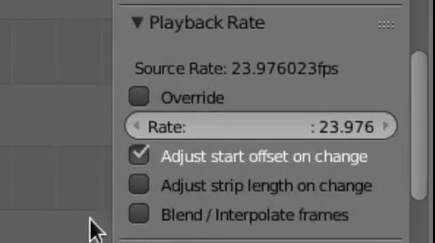
Hi folks, I have made a playback rate control for VSE strips that I find much simpler and faster to use than applying Speed Control strips to everything. I made a demo vid to compare the workflow, does anyone have an opinion on it?
Would any blender devs consider including this?
Thanks for any feedback!
5 Comments
This looks great.
Has there been any progress in getting this into Blender master?
Is there a version I can download to test?
I have same question :)
It looks really good! How could I download the patch? It's no problem for me to recompile Blender. Today I was editing a video and this rate control would have been very useful. I could also provide some feedback.
I was just going to make suggestions of workarounds until I saw that you had already implemented a fix your issue! Wow. Great work. I love the idea of making source media playback a strip property. But then scale, rotation and crop should be as well. Anyway I'm quite impressed.
Can you keyframe the playback rate variable, keyframe-able?
Could you make other mismatched strips conform to the scene FPS as a global setting? So that if you decide to alter your scene from 25 fps to be 30 fps, all of the 25 fps footage would change accordingly?
Interpolating frames would be handy (optical flow most handy) but frame blend is fine. I gather that Blender Foundation prefer that frames remain discreet so only the current frame is addressed in architecture of application (no temporal shenanigans with frame buffers).
Whoops, put this reply in the wrong box before...
Playback rate isn’t currently keyframable, because the maths to calculate the new strip length would depend on the keyframe values which felt like a very complicated bit of maths (plus I don’t know where the hooks are to fire when the user changes the keyframing).
I haven’t yet got hooks into what happens when you change the scene FPS (needs to be done anyway to recalculate already-overridden strips). I think the best way to handle your suggestion would be to tick “override” on any strips you want to keep at the current rate (but not change the rate), then change the scene FPS.