
Add Inscribed, Circumscribed and Edge options
Proposal
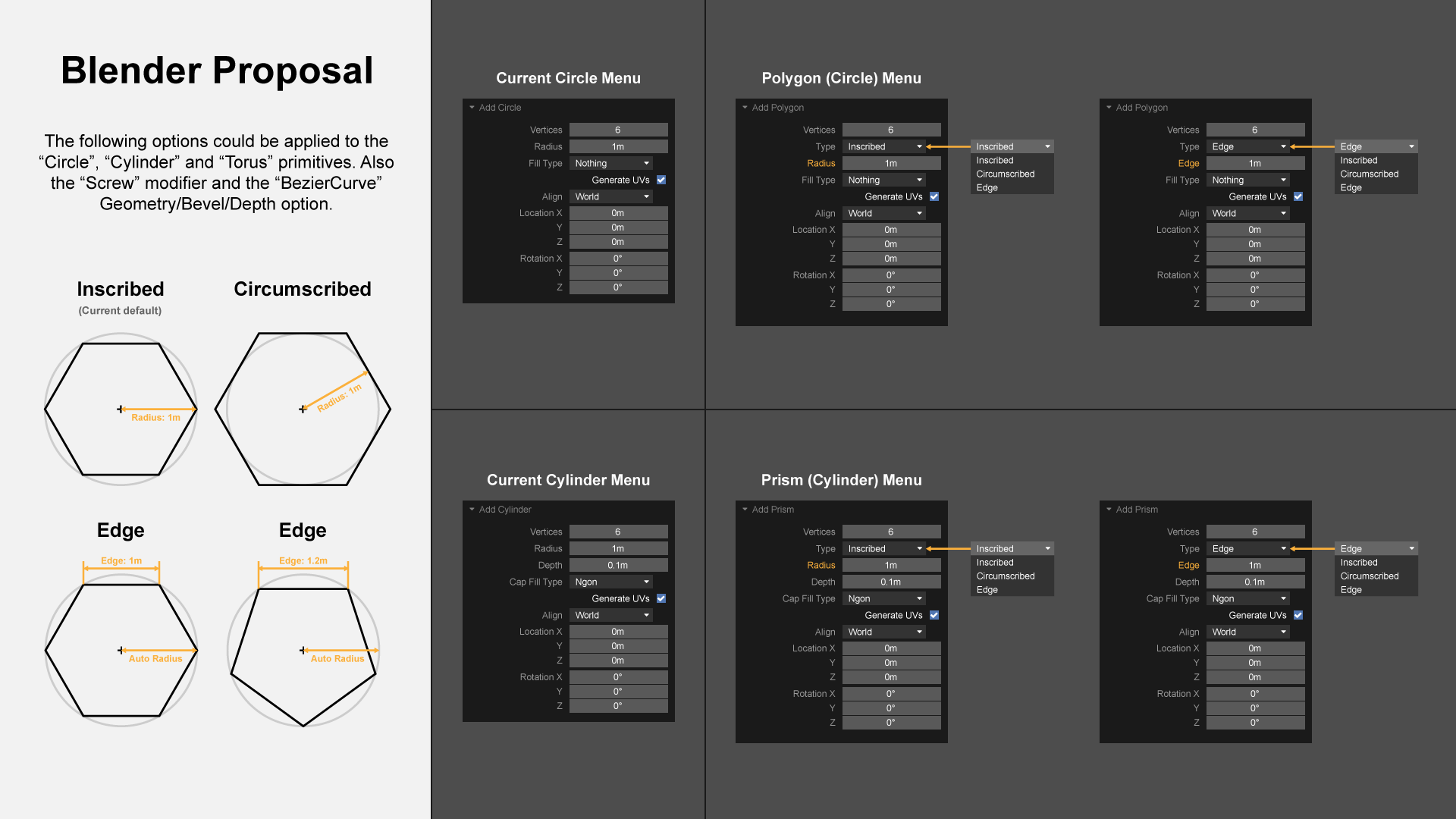
I propose adding Inscribed , Circumscribed and Edge options for "Circle", "Cylinder", "Cone" and "Torus" primitives. In addition, the same options could also be used for the “Screw” modifier and the “BezierCurve” Geometry/Bevel/Depth option. This would make it a lot easier to do precision modeling for engineering mockups, architectural mockups, product design and 3D printing. I believe adding CAD-like functionality to Blender would entice more users. I have created a diagram with examples to demonstrate my thoughts.
Side note
I believe the Add/Mesh "Circle", "Cylinder" and "Cone" should change to "Polygon", "Prism" and "Pyramid" respectively. Or at least something like "Circle (Polygon)", "Cylinder (Prism)" and "Cone (Pyramid)". I believe the current Add/Mesh primitive naming is a bit misleading. For example, I often create triangles, hexagons, octagons, etc, which are 2D polygons and not circles. Same for triangle, hexagon, octagon, etc, prisms which are not cylinders.
1 Comment
What I Disagree With
I like the naming conventions as they are. I especially dislike the "Polygon" name since it is far too vague. A polygon can be absolutely any 2D shape.
I really don't believe there is any confusion between Meshes and Curves. You have to be in Curve Edit Mode to add curves and in Mesh Edit Mode to add meshes. Also, while in Object Mode, adding Curves and Meshes are broken into 2 different submenus.
What I Do Agree With
Maybe we could call your "Type" "Radius Alignment" instead.
Also, not that there is a problem with your choice of terminology but, I think "Radius Alignment" values should be ("Vertex", "Edge", "Face") ("Face" for 3D objects) . Reasoning > Just to stick to terminology that people already use as well as consistency. (Like in Mesh Edit Mode you get those same 3 sub-modes.)
If we want some serious options we could add ("Edge Length", "Area", "Volume") to those options as well.
Current Situation
Imagine a perfect Sphere:
• When creating a Circle or a Sphere, the Vertices land on the radius of that sphere.
• When creating a Plane, the Edges land on the radius of that sphere.
• When creating a Cube, the Faces land on the radius of that sphere.
It all makes sense to me but at the same time it breaks consistency in my mind.