
Multiple Frame Ranges
Please give us better control over rendering frame ranges.
Currently the user can map frames between two values using 'Frame Start' and 'End' and can specify the step value. We need a button above this section that reads; 'Add frame ranges' with a plus button for adding another frame range and minus button for removing unwanted ranges.
This is for many of the same reasons that printers allow multiple printing ranges. Say that you're on a sensitive moment in production where parts at the very beginning and end of your film in several specific areas need to be regularly re-rendered. Like a blend file missing an object, you don't recreate the entire file, you append the missing object as a blend. So in rendering, we shouldn't need to re-render the entire sequence if we only need a few frames to append to the comp.
Because of the nature of editing; we need more specific control over render ranges. We have many scenes that contain blank frames that should not slow down the entire rendering process if we can specify frame ranges.
Imagine if you had a spec that showed up on very specific frame ranges throughout different scenes? Say someone noticed it in frames 9-200, 500-650, 720-725 (maybe a whole page of these). Maybe the entire animation needs re-rendering, or using frame ranges; maybe just 1/3 of the animation? So your rendering takes 3 times faster if you have better control over rendering.
And imagine if then you could layer frame ranges in a additive and negative manor for even more control.
Furthermore along these lines; Node Outputs could also have this option which would allow for specific frames only to impact and come through the compositing process. So if you need to create very specific render passes where some outputs have only used frames 1-50, and another uses just one; (frame 99). If you have more than one thing in a scene to render and one of them is still, why re-render a still along with the animated frames?
Current Workarounds:
There are workarounds that are counter to Blender's intuitive design. CG artists are supposed to be masters of their craft, but can only master so much with so many workarounds to burden them:
-Some recommend using VSE; but what then if you need the frame numbers to remain the same? that requires third party work to batch rename files which is just extra stuff to learn.
-Some recommend using Python: But why do you need to know code to render specific parts of your animation?? That's asking too much of the average user to achieve a simple yet highly useful feature. When users have to copy a script across for something like this; it's a red flag for design simplicity.
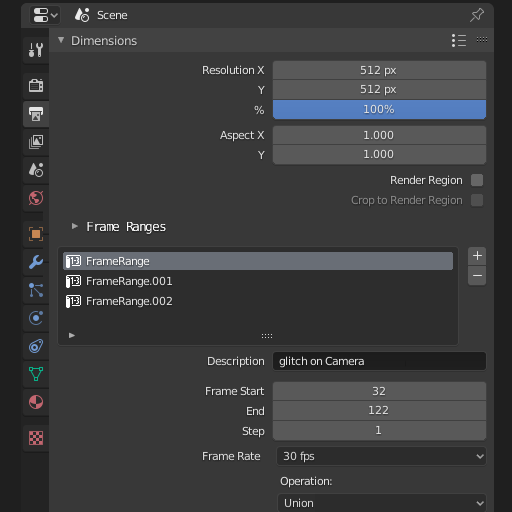
5 Comments
+1 for this feature. It's essential.
Currently as a workaround I'm using command line rendering. For example this renders frames from 1-10, 20-30, 40-50 :
Hey coders! Help us! we need this!
This is just more evidence that the scene manager tied to view manager and then an easy render all scenes or write all scenes to batch script - or just simple render wrangling UX is needed.
I'm with you. This is not the first time I'm seeking this resource
Blender needs an additional optiinal scripts section. Similar to addons but has it own purpose and separate place.
There are times when there are scripts that are too minimal that for some reasons in my own opinion doesn't count the standards to be part of the addons. I guess these type of things should be included in the miscelanious category or just a create a whole new section of it outside the addons tab.