
Auto IK Option 2.0 --- the future of Rigging & Animation in Blender is at next corner?
Hello, Folks!
There's been a while I've been exploring the potential of vanilla "Auto IK Option" in Blender for 3D Rigs & 3D Animation, and I believe, if it received just a little attention an love, it could become really outstanding for Animation, providing: ready-available, versatile and actually pretty advanced Posing solutions; thus making lots of very complicated Control Rig's Setups much less relevant, as lots of good stuff could be achieved directly on Pose Mode, with the already fascinating system named Auto IK Option (often underrated), but on an upgraded version of itself (the 'Auto IK Option 2.0' in the title is more for alegoric fun).
I have made these video demonstrations on Youtube (sorry, 40min, but you can speed up; and Timestamps are ready in the Video Description!!): youtube.com/live/BjnM3q7tnwY
It is a bit complicated subject, this is why I've made the video, and below, I try to name the improvement requests (I'll try to bring a few screenshots for better contextualization too):
-
Development of an "Auto FK Length" Property (similar to the current "Auto IK Length"), for mimicking the Pinning feature on a specific Bone Joint, and on-demand because this kind of Property is switchable during Posing with Auto IK Option. Current way of using Auto IK Option:
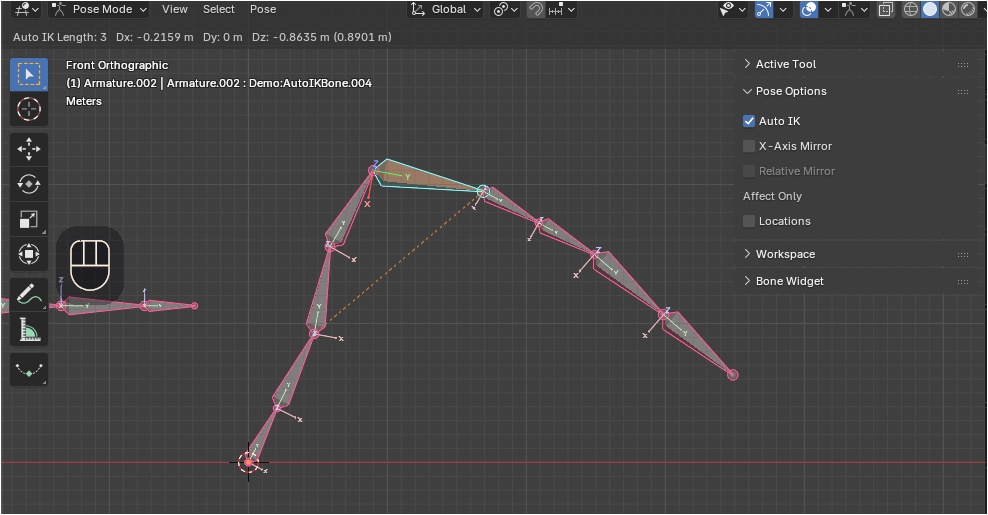 Auto IK Option 2.0:
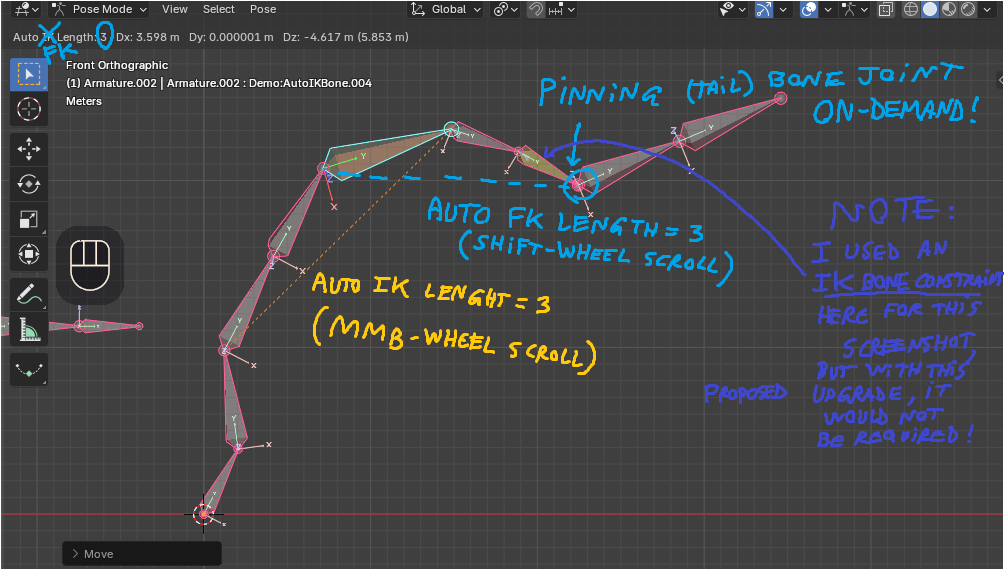 Note: The "Auto FK Length" would work in parallel to the "Auto IK Length" Property (they can be used in combination alongside a Connected Chain of Bones, as they should not conflict: as they include/exclude Bones in Opposite Directions: FK & IK respectively); and while "Auto IK Length" employs the MMB-Wheel Scroll, I suggest the hypothetic "Auto FK Length" to employ the Shift+MMB-Wheel Scroll.
EDITED (19/Sep/2025): I wasn't actually inspired by any other 3D softwares, just playing with Blender. However, I've procured this useful clip with 2 tiny examples from Cascadeur of what could be an use for such Auto IK + Auto FK behavior in practice in Blender; So, check the linked clip and imagine that's 'Auto IK Option 2.0' in Blender: From 0:00 to 0:05, the Distal Phalanx Bone is Grabbed, Auto IK Length is set to 3 (reaching the Proximal Phalanx), while Auto FK Length is set to 1 (and FK Pinning feature(s) is(/are) correctly Enabled). Then from 0:10 to 0:17, again the Distal Phalanx Bone is Grabbed, but Auto IK Length is set to 3 (reaching the Proximal Phalanx), and Auto FK Lenght is set to 1 (same settings here for FK Pinning also). youtube.com/clip/Ugkx6dlSidoFaGUJEazEl3Q-nOD_Gci4NZIA
-
While using Auto IK Option, if Grabbing the Last Bone in an IK Chain which has a Parent with a Disconected Parenting Relation (Offset Parenting), FREE this Bone's Posing: i.e., allow it to be Posed as if it had the current state of Unparented Relation (as if it had no Parent Bone); because currently, it is held Locked in its Location from its Head Joint.
-
(this is a tiny, yet a necessary adjustment for the bigger picture): Allow the Pinning feature to occur, beyond the rare case of a Skeleton Chain in which the Last Bone in the IK Chain is left Unparented; what I mean is: Expand the Pinning feature, in order so that it will occur, also, in the case of a Skeleton Chain in which the Last Bone in the IK Chain has Disconnected Parenting Relation (Parent Offset).
-
Allow the Pinning (of the Tail Joint of the First Bone in the IK Chain) to occur, even if the Grabbed Bone, with Auto IK Option, is not the Last Bone in the IK Chain.
-
An 'Auto FK Pin' (or Pinning) Generic/Global Option, Boolean On/Off, in the Pose Options Panel; close to where the Auto IK Option is located in the UI. Disabled by default? AND/OR 5b) An 'Auto FK Pin' Option, Per Bone, Boolean On/Off, on the Inverse Kinematics Panel. Enabled by default? Works only for Auto IK Option (in principle)?
-
An 'Auto IK Length Blocker' Option, Per Bone, Boolean On/Off, located on the Inverse Kinematics Panel. This would be a more advance,d more specific treshold, to 'Block' (limit) the extentension of the Auto IK Chain Length along a Connected Chain of Bones, so that Bone's Head Joint would 'Block' the possibility of extending the Auto IK Length further. Although Disconnecting the Parent effectively 'Blocks' the Auto IK Length functionality, it would allow more Customization if the Rigger/Animator could maintain the Rig Connected but also decide Blocking (Head) Joints; also, it can prevent accidental Posing (on bigger undersireable Auto IK Lengths) which is very common with Auto IK Option if we are Selecting a Bone for Posing, then we Selecting another Bone but forget adjusting the Auto IK Length Property; with a Custom Blocker, we can maintain Bones Connected and still have such facility [of a 'safe', Custom Blocking Bone Head Joint]
Thanks!
ADDED REFERENCE #1: The concept of "Ephemeral Rigging", which is actually the essence of the ingenious Auto IK Option (but which could receive some nice developments): youtu.be/Juq0nQH2lwc
3 Comments
Wow this is pretty good. Need to get more eyes on this to get it going.
Thank you!
I still need to bring additional images to the Feature Request and improve some sentences; but a from the Youtube video at least it is a bit easier to grasp the accessory topics for the time being at least.
Do you happen to use Auto IK Option in creative ways? Or have experience from other softwares which employ Inverse Kinematics (or other features) in different ways than Blender for 3D Posing/Animation?
Sorry for the delay, I think Maya use Inverse Kinematics in the past. Can't recall if they improved on it or still using it. Since i switched over to blender I have not touched it much.