
Display overlapping uvs
As far as i know, there is no way to see if uvs are overlapping? This boggles my mind. This is incredibly important when packing, unwrapping, any type of uv work.
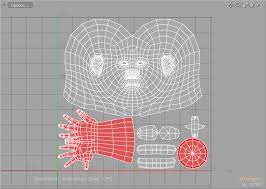
Can we please see when something is overlapping by showing a color difference? Here is a screenshot from modo. This shows similar to what I have seen in other software.
3 Comments
one of the addons that ships with Blender is called "Magic UVs", and there is an option to turn on overlapping UV display.
docs.blender.org/manual/en/latest/addons/uv/magic_uv.html
That said, yes I agree- having something built in and real-time would be much better.
I will look for this now. If it works, it is a start but I feel that overlapping, flipped, all of that is so basic that it truly needs to be in blender by default.
My student is attempting to solve this issue by writing an addon as a part of his bachelor's thesis. Check out the git page, or you can download the addon for free on gumroad.
gitlab.fi.muni.cz/xbilek2/visual-uv
werecat.gumroad.com/l/ezkqi