
3D Cursor position buttons
In the N sidebar, add buttons for common actions to position the 3D Cursor.
- 3D Cursor to World Origin
- 3D Cursor to Selection
- Selection to 3D Cursor
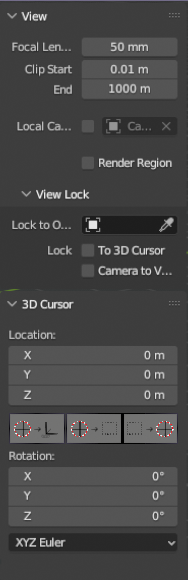
Notes: To access these commands currently you have to know to press Shift-S, find the command in the popout wheel and select it. They could also be found with F3 search too if you know what the command spelling is. Adding the buttons to the N sidebar with mouseover tooltips make these actions easier to access, discoverable for new users, and improve productivity, especially for tablet users.
3 Comments
There is a Shift+S piemenu shortcut for these buttons. Currently, the N-panel doesnt have a lot of buttons in its default tabs
3D cursor is invaluable in Blender and one of it's main selling points for modelling workflow imo. Exposing more stuff like this to the UI definitely helps with accessibility and discoverability.
I don't use a 3D cursor if I can avoid it, but I think it's a good suggestion.