
Gpencil:Solution to sudden jump of stroke while using offset modifier (+ Layer center point)
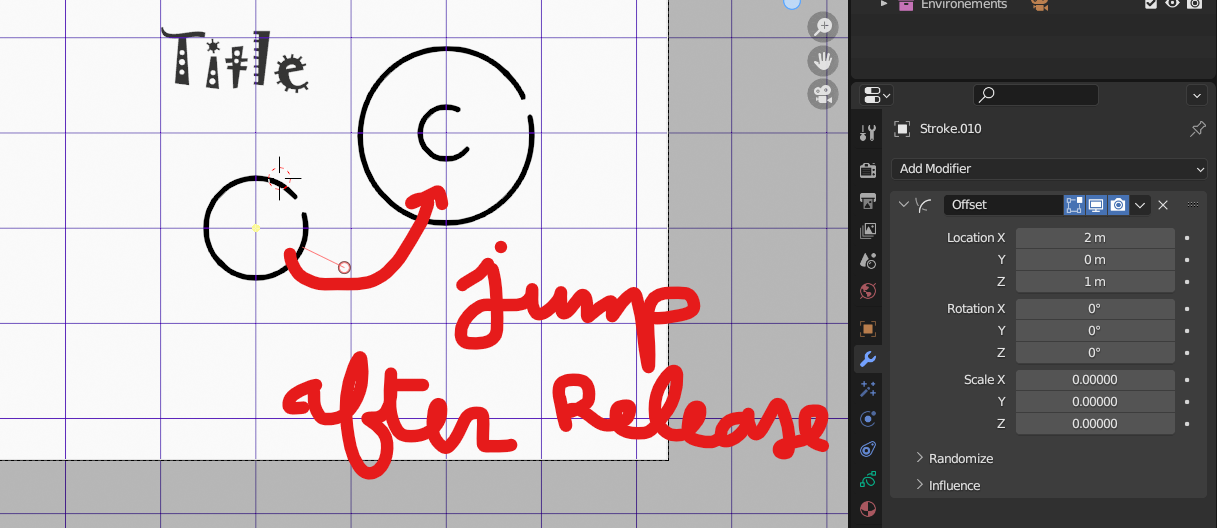
while we desire to use offest modifier or any modifier support a location/rot/scale offset and we want to draw some stroke in a specific place after releasing the pen or the mouse we suddenly see the stroke jumps to another place.
-
i propose to show layer center point to see if the center it's already offseted or not and also predit aproximatively where the new stroke can jumps ' as example .notice that Guide feature is benefited from this already by the yellow dot when we use it' but not related to layer location
-
i propose a check box called 'apply offset ' in draw mode top bar, this make any new stroke don't get the sudden jump but take actual place as it was already offseted , eventually offset modifier do it's original work on all stroke
and the idea to make this work i was thinking of take where the stroke is drawned then substract actual values (loc/rot) of the any modifier do the offset => then the modifier will add the substracted value to cancel the substraction as a result no jumps is there , eventually considering the stuck of the offsets modifiers .
0 Comments