
2.8 Proposal - Automated Render Pass Outputs (Reworked Passes Panel)
Issue/Problem: Ahhh, How Do I Do?
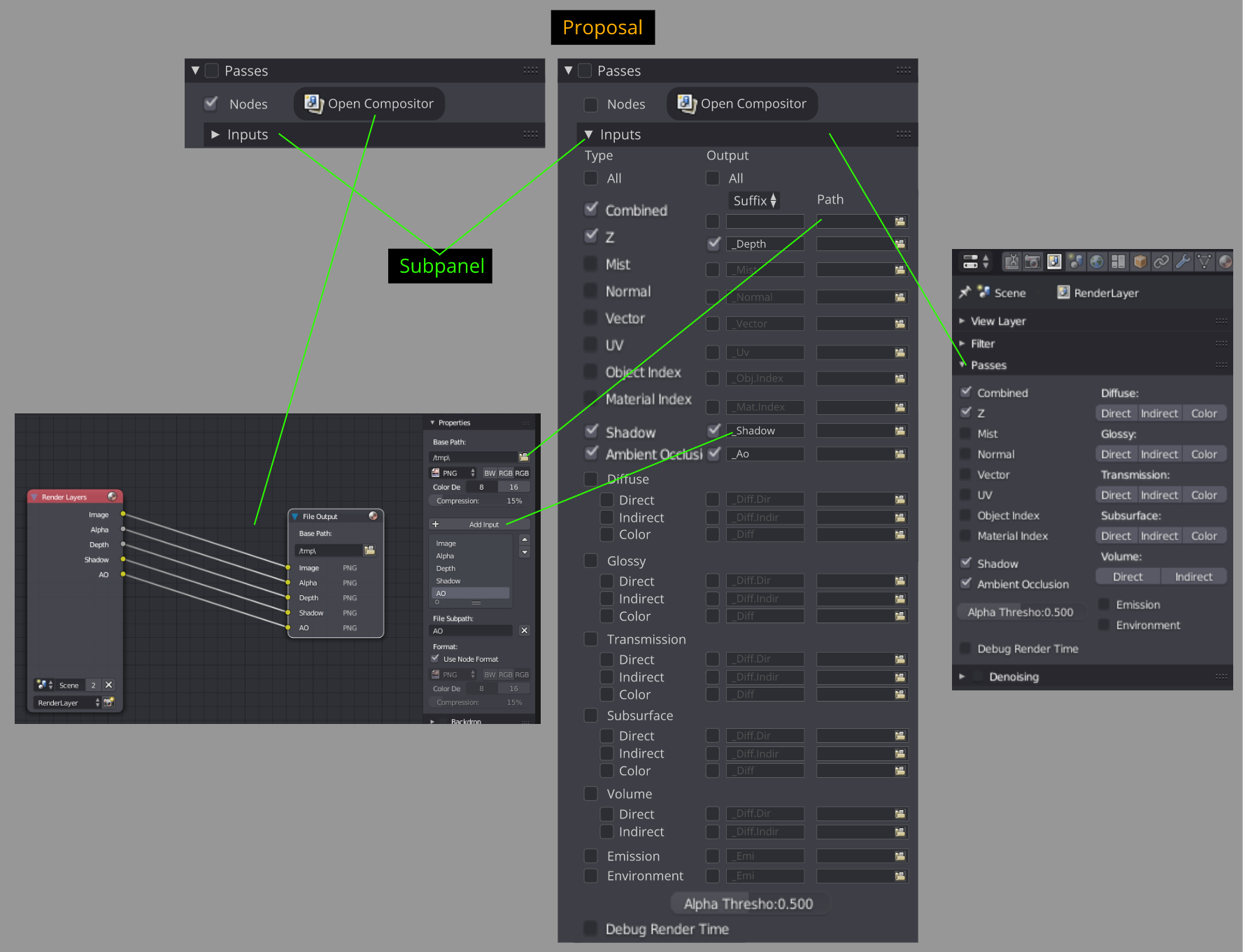
- To render out passes for animation sequences you have to go to the "Compositor" and setup a couple of nodes. Not the most obvious thing to do, especially for new users.
- Simplifying and increasing accessibility to this task is something that can be improved upon.
Solution/Improvement: I Can See You
- A rework "Passes" panel including an "Inputs" subpanel and "Open Compositor" button.
- Nodes are automatically generated and linked to the "Compositor" checking the tick boxes. The "Inputs" as you can see is huge hence its broken into a subpanel.
- Straightforward access to individual path outputs and naming conventions (eg. suffix).
- This teaches the user and simplifies the node process on how to batch render animation passes.
6 Comments
Though, I wouldn't put the filepath to each. Maybe commands like //../render_pictuers/{scene} {pass}/{scene} {pass}_{frame} call cards.
Quick node tree build system, makes sense.
I get that the Open Compositor button is for showing the Compositor... but where?
@Jason van Gumster: I'm not sure what you mean by where? Where as in how the Compositor will open? I was thinking as a windows popup similar to 2.8's RMB "Open Drivers Editor".
@fudushae: Can we conceive of a way to do it without a pop-up? If someone is planning on bringing up the compositor, it's not for a one-off thing. It's likely to do some in-depth worth. So it's best not to have a pop-up and instead work within the non-blocking model.
@Jason van Gumster: I chose it as a windows popup for the one off interaction for passes & discoverability (especially for new users). Instead of this, maybe have a dropdown menu option under the Compositor button called "Open As" to choose whether clicking the button would either: