← All ideas11 Mar 2019VyachDoneShading and TexturesCompositingUser InterfaceVyachAnubisMasterBlender_DefenderDraiseFyne-QJosephbburgKavukamariLauloqueShimoonVikbnzsdcb.creativedfcuellarferranmartinezclarfilibisguillaume_blenderivan-kolnogorovjhutterskeyframesarecoolknorthfekoko_zemomotron2000navarroblayapsyhozsodareanimateromanvolgushev4565ximarix
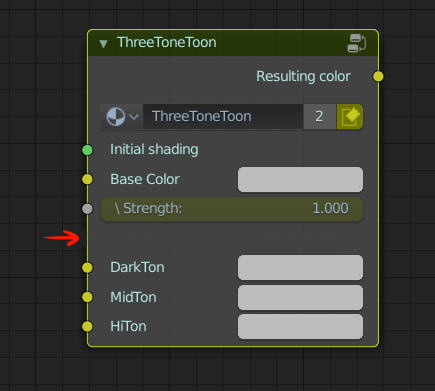
To have ability to separate groups of inputs.
May be even roll-down groups for very complex nodes
Like this:
100%
Development Status:
Done
Upvote26Downvote0
V
Vyach
11 Mar 2019
9 Comments
V
VyachAuthor
Counting as «done» as we have panels/grouping now
K
Kavukamari
I was just about to suggest the same thing, I think this could be a really good organizational tool for node groups!
j
jason
How would you suggest that the user go about adding that spacer? What does it look like when you Tab into the group node?
V
VyachAuthor
*
@Jason van Gumster
* empty inputs (not connected inside) can look like this (no input outside). No input and no label = spacing that can be converted to input or deleted the same way. Or any input can be converted o spacing with context menu. Or there can be move like Ctrl+cut between inputs to add space.
Of course additional button only for spacer is bad idea.
1
K
Kavukamari
it could just be a different type of "input" like "Vector, Shader, Factor, Color, Integer, Spacer" and it could use the name of the input to name the "group" of inputs below it, if the user wants, or leave it blank, too, if they want
J
Josephbburg
Great idea!
m
momotron2000
good idea!
V
VyachAuthor
*
@momotron2000
* Thanks. Making a lot of nodework today so it became obvious to me
V
VyachAuthor
Can be added the same way as input.
may be any empty input will act as spacer without input-socket, until it`s not connected to something

9 Comments
Counting as «done» as we have panels/grouping now
I was just about to suggest the same thing, I think this could be a really good organizational tool for node groups!
How would you suggest that the user go about adding that spacer? What does it look like when you Tab into the group node?
* @Jason van Gumster * empty inputs (not connected inside) can look like this (no input outside). No input and no label = spacing that can be converted to input or deleted the same way. Or any input can be converted o spacing with context menu. Or there can be move like Ctrl+cut between inputs to add space. Of course additional button only for spacer is bad idea.
it could just be a different type of "input" like "Vector, Shader, Factor, Color, Integer, Spacer" and it could use the name of the input to name the "group" of inputs below it, if the user wants, or leave it blank, too, if they want
Great idea!
good idea!
* @momotron2000 * Thanks. Making a lot of nodework today so it became obvious to me
Can be added the same way as input. may be any empty input will act as spacer without input-socket, until it`s not connected to something