
Full CAD drawing toolset
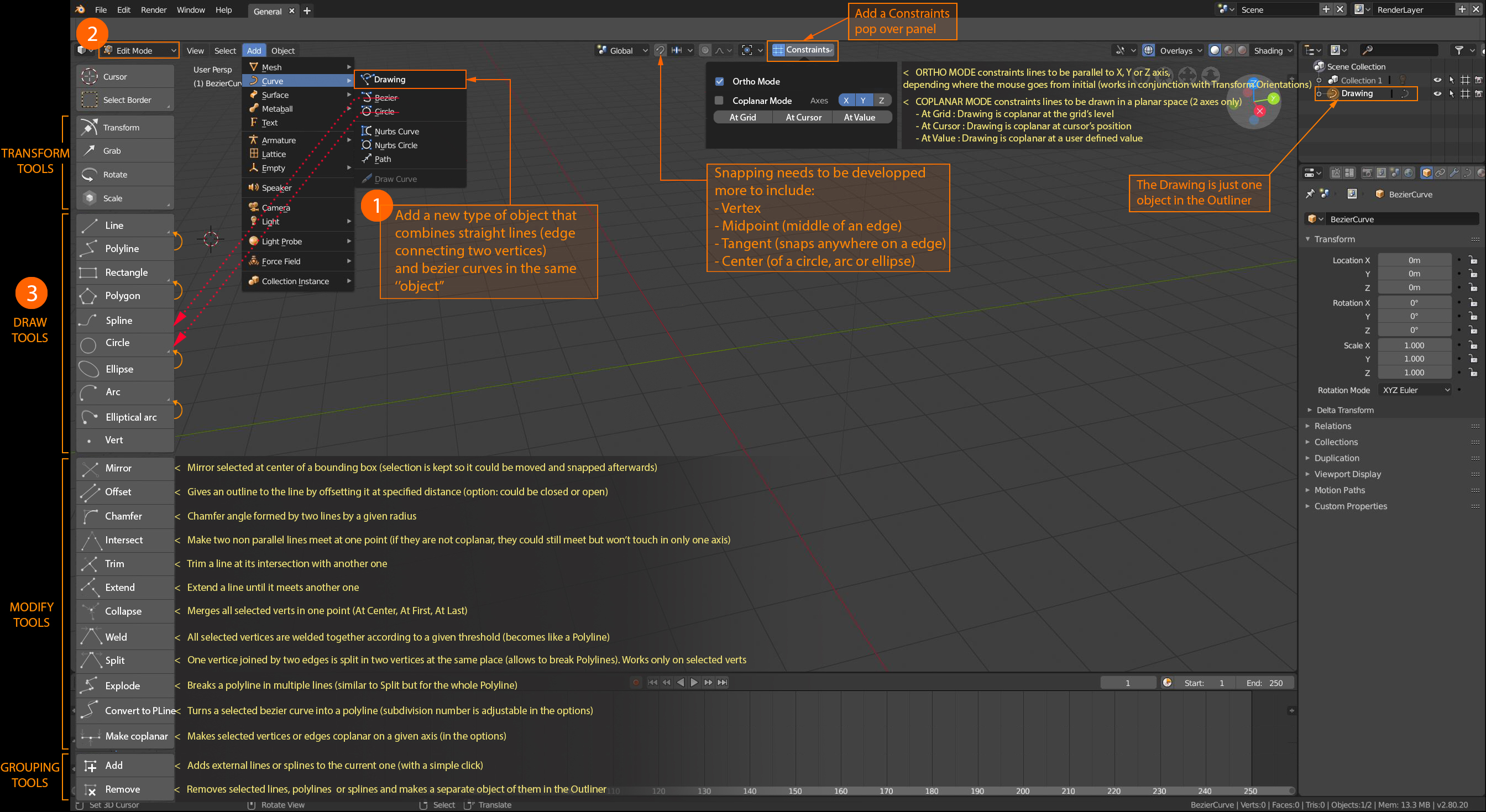
A new set of essential CAD tools for precise drawing integrated in Blender. Currently such tools are scattered through various addons (TinyCAD etc...) but they need to be grouped together in one place for a more intuitive use.
THE PROCESS:
1) Add a Drawing Object
It will be placed at the cursor's location as any normal object, but it is an empty. Note: It appears as a single object in the outliner.
2) Go into Edit Mode
It's empty, there is no geometry.
3) Select a tool from Draw Tools
We should be able to draw the lines by point anc click directly in the viewport:
Exemple:
1) Select "Line" in the Draw Tools
2) Click first point in the viewport
3) Click second point in the viewport. The line is traced!
For drawing with more precision, we could enable various Snappings, toggle Constraints (see below) and place ourselves in the correct Orthographic Viewpoint.
56 Comments
excellent , yet another thread that talk about implementing cad worlflow into blender
we really need more devs
@dodododorian: and yet another cad like proposal where upvotes are going trough the roofs
And yet 3 years later no interest from blender what so ever.
I don't know about full cad drawing support going into blender all at once (mainly because of the huge amount of work involved), but better spline manipulation/drawing tools would be very welcome. I don't think a separate mode is necessary, because the edit mode toolbar is pretty empty for curves.
@dpdpforlife: cad modeling and mesh modeling are technically very different and incompatible with each other, so a separation of the type of objects is required and consequently the tools needed for modeling ... and it is not true that there would be a large amount of work in the implementation ...
it would be too complicated if we tried to make an implementation that would try to mix the two techniques.
in reality the two modeling modalities would remain separate, and if in case we could adopt conversions from nurbs to mesh as already happens
@dpdpforlife: Maybe "Full" is a little misleading here, in the sense that I didn't mean to implement a full CAD suite in Blender. More like to emulate the drawing tools of a CAD program to facilitate drawing in Blender.
Some addons already have some of the modifier tools. As for the drawing tools, if we can already make a circle, then why not a rectangle, or a straight line?
Basically, I just proposed a better organisation of almost already existing tools. I think it is very doable. Blender has everything it needs right now to make it.
@kaluzny.christian: I'm sorry but I think you do not know nurbs modeling at all and why it needs to be implemented in blender. Take a look at this short video youtube.com/watch
@amonpaike: You're right, I never model with NURBS... Your video is indeed very interesting. It would be pretty neat if we had that in Blender as well. But I think it's another proposal. ;)
@kaluzny.christian: no it's the same proposal.. Non-uniform rational B-spline there are at the base of the CAD modelling... blender has already NURBS curves and Surfaces but they have remained in the rudimentary stage for many years en.wikipedia.org/wiki/Non-uniform_rational_B-spline
@amonpaike: Nurbs is an entirely different system. It's really not the same proposal. Nurbs is incredibly outside of the scope of better drawing tools. Making useful nurbs tools inside of blender would take completely reworking the existing capabilities, which would greatly rob development time from the core userbase of blender - dcc users. They have little to no use of a full blown nurbs toolset. 3ds Max, Softimage|3D and Maya had nurbs tools and they have been pretty much abandoned because of the work involved in maintaining functionality vs. how (not) useful the nurbs tools are to artists.
Nurbs used to be the best way to get organic shapes in these packages but SubDiv workflows quickly replaced them because of the great amount of work involved in keeping nurbs surfaces seamless and smooth. I've been in the murky world of using nurbs for modelling, and I don't want to go back.
My job lately has been 50% 3D solid modelling using Inventor and Solidworks, so I know the advantages and disadvantages of these tools that you describe as nurbs are used to represent the surfaces of solid models. These tools are great for doing hard surface modelling. You have nondestructive bevels and boolean like operations that don't have the strict requirements involved in mesh based booleans (I'm referring to the artifacts caused by coplanar faces, overlapping edges, etc.). The advantages are plenty and the disadvantages are many. Adding this capability to blender would bloat the software greatly. The code would be unmanageable and the software itself would likely double in size. All for a tool that few would use and that can be done already with other specialized software.
@dpdpforlife:
I know the diversity of the two systems ... that's why I wrote above that modeling mesh and nurbs must remain two separate objects especially during modeling. the best way to work with both technologies, which have both their advantages and disadvantages is that they remain separate and independent from each other, both at the level of architecture and at the level of tools that are adopted during the modeling phase. it is here that programs that have adopted hybrid systems in the past have failed ...
after all, this kind of separation between different objects already happens with greace pencil ... the same thing would happen for nurbs objects for cad system
in the case of the nurbs you can work in a model of conversion from nurbs to mesh effective after modeling, to allow the use of modifiers and classic tools of modeling and animation mesh .. then so much better ...
but the advantage of modeling nurbs is the high precision, the speed to model certain types of objects ... and open blender to the industrial world that is vast ... and with 3d printers even at amateur level, experimental, research, prototyping it would be a great advantage.
the code is "simple" just adopt an existing architecture and language as openscad ... look at my other proposal ... blender.community/c/rightclickselect/yTbbbc/cad-cam-cae-openscad-open-nurbs
@amonpaike: My main point is that this proposal is not in any way related to nurbs.
@dpdpforlife:
but the tools you listed are tools that handle splines and nurbs ... so I do not know how you could do if you do not use nurbs ... with polygon segments you will not be able to create curves ... certainly not in the way it makes sense for the cad ... at that point it would really be superfluous to have these tools available
@amonpaike: Have you ever tried to make anything useful from a nurbs curve? I have a feeling you've seen some software that uses trimmed nurbs for surface representation and thought that would be neat to see in blender. It would. Trust me, it would be great. Unfortunately, Blender would need a great deal of work to ever come close to that easy workflow that you're seeing with those programs. Whether it uses existing opensource libraries or not.
Understand that when creating those types of hard surfaces for industrial design, it is very rare to use features exclusive to nurbs create the underlying drawing. Mainly because you don't have anything to measure against in an organic, flowing curve. Normally drawings are created with straight lines, arcs, ellipses, and fillets/chamfers. In other words, bsplines are more than sufficient for this. The ONLY reason to use nurbs curves over other types of curves is to draw freely flowing shapes, which again, are better made with subdiv. In fact, the one hold out using nurbslike free flowing surfaces has been industrial design. But the current state of the art for industrial design for cars and other items with flowing surfaces is to use subdiv workflows which the software internally interperates as a nurbs surface.
This proposal addresses a basic need of being able to snap drawing elements to other drawing elements. This functionality is needed to be able to create drawings quickly and efficiently for technical illustrations, archviz, and hard surface modelling. If you bring nurbs into the conversation, this will never be accomplished because nurbs are far beyond the scope of what blender needs to be focused on and beyond the scope of what is required to make hard surface or technical models.
Nurbs does provide "user friendly" way to represent curves, but even in cad systems in the end your lines / 3d models are made of (much more) segments and faces, generated on the fly using parameters.
With architectural models, unless you work under true georeference, current precision is by magnitude enough.
As long as user make "intelligent" use of available space boundarys and appropriate scaling even single precision is not an issue - you simply have to rescale your model outside of blender, where you won't loose precision doing so.
Missing features in python api is an issue, eg: even simple snap require tricky hacks to work properly - hope this will be adressed in 2.8.
As conclusion, the point with CAD pipeline in blender is less precision than end user contributions, most existing tools require lot of work to maintain and nobody can do it forever for free, this is true for a better snap system implementation (a mano-wii contribution) and efforts to enhance and make a unified interface for existing tools.
Guys, just an ability to draw a dumb straight line for the beginning, or being able to snap to a middle point of a freaking edge... I currently have to make a 6 - step procedure just to make a two point straight line of a given length...
Mesh or curves or whatever...
@Okavango: we can not blame you :D
* @nokipaike * What does my reply have to do with mesh modelling?
I think introducing a whole new object type for a specific workflow is difficult. Instead what could be done is to implement all the cad functions to work on Edges/vertices. Infact there is already an addon included in blender 2.82a which does that devtalk.blender.org/t/making-an-add-on-for-precision-drawing-tools-cad/8637 . The only problem is that it lacks direct mouse operations. Like in autocad where we can select two intersecting edges using the trim command and trim is done whereas in PDT addon the process is not that straight forward. So I guess mouse interactive operations might be implemented in the future updates?
CAD = Computer Aided Design. Blender = Design tool on a computer. Sounds like they could work together?
I don't think it would take that much to progressively extend and improve what we already have.
Blender is already a computer aided design tool. Hoses for games, movies or to live in are all houses, its just the level of precision and detail in the lines. Maybe we just need to change the paradigm. What do you think?
Being a CAD user for many years I would suggest live it to the CAD software to deal with numbers, BUT make a HUGE leap toward getting major cad file formats imported properly in Blender. Or even a "LIFE" link (getting ahead of myself) between Blender and major CAD software. I am stuck of using Max for visualization and would be nice if I can utilize Blender in that regard. This is the ONLY reason I am still using Max. It is little silly when I see somebody just slap an image of a floor plan and start extruding not even trying to at least get it in some scale. I would like to exchange files between CAD and Blender without being worried about dimensions.
It gets brought up every time, but it's worth mentioning again that Blender currently does not have the numerical precision of a proper CAD tool and compiling Blender to support double-precision floating point numbers is a non-trivial task.
Not saying it shouldn't be done, but it's important to emphasize how huge of a task this would be and how fundamentally different CAD approaches are from Blender's underlying code.
@Jason van Gumster: Just for my information, could you elaborate on that?
Being curious...
Thanks.
@kaluzny.christian: Most CAD software uses double-precision floating point numbers... or implement their own system using integers and shifting around a decimal index. Blender uses single precision floats. It may be possible to recompile Blender using doubles (I've tried), but it's not a simple task. Not only does a lot of Blender's code assume single precision, many of the libraries that Blender uses for manipulating 3D data also use single precision floats.
It's not impossible to do, but it's a very large, cascading problem to solve... with the primary benefit being the ability to add functionality that isn't used (and may not ever need to be used) by Blender's core userbase.
@Jason van Gumster: I see... One more question though: Why is so much precision needed in the first place? Couldn't it be made with single precision float? Isn't that enough?
@kaluzny.christian: Part of that certainly deals with the type of CAD work that you're doing. Unfortunately, the expectation is that most CAD tools work the same, regardless of the specific thing being drawn and the scale of the project. Since developers can't predict the type of CAD work being done (and the scales that need to be used), they opt for the highest precision values to accommodate every use. The alternative would be to say something along the lines of, "This is a CAD tool, but only for parts and not the big thing that those parts assemble to." That doesn't sell all that well. :)
I think you should really reconsider what this and other suggestions made in terms of 'precision modelling' with Blender are all about. You have been repeating this point for times on, i have an impression you do not quite grasp what is the problem here.
Engineering app standards aside, Blender simply lacks the FUNDAMENTAL modelling tools for fast contour / primitive drawing, snapping and shape modifying and i think that is because it's 'core user base' did not venture much out of artistic implementation of it. You can actually achieve all that the guys that made this suggestion and upvoted it want - just in an incredibly slow and inefficient way.
Just look at the suggested tools. You already CAN make a polyline, rectangle or a circle at a desired place with desired properties, you already CAN trim mesh edges in Blender, only you would loose an incredible dumb amount of time and nerves doing it. Blender simply lacks a standard set of tools that maximizes it's EXISTING technology.
Lack of double-precision floating point is not an excuse for this.
The result of years of anger and despair: blenderartists.org/t/np-station/686462
@Okavango: Yes. Part of it is a bit of a knee-jerk reaction when the term "CAD" is brought about.
Improved modeling tools are always welcome. However, we should be careful not to classify them as CAD tools, lest folks start to think Blender could be a full-featured CAD application... and then get disappointed by the fact that it isn't.
Ok. If that is what it takes, i fully agree. What is the freaking term then?
Precise modelling? Primitive snap sketching?
Let's finally make Blender really fast at generating and modifying primitive shapes, and if the CAD disappointment train should appear, let's worry about reapplying those fast and nifty tools in a double - freaking -precision floating - excuse my frustration - point after that. How about that?
@Okavango: Agreed. Noone is asking for 64 bit accuracy. We want to be able to quickly draw shapes while snapping to geometry. If a midpoint snap is 0.00001 blender units out of being completely collinear, I don't think anyone is going to be complaining too much.
@Jason van Gumster: precision unit are being worked on qnd will be put on 2.8
* @Jason van Gumster * yes but if they add CAD functionality userbase will increase at an exponential rate. A good open source CAD software is really needed. I hope someday Blender will fulfill it.
First it need support for more CAD files formats export/import... Very huge & ambitious suggestion. So many tools. It have to be new " Draw " mode like " Edit " or "Sculpt ".
@forestgumpovu4: I really struggled to find what kind of object could be editable. My primary goal was to showcase the CAD tools. But yes it could be a new mode.
2025 and we dont have this CAD drawings tools. This is a must!!!
Good proposal
Is anyone working on something like this?
The problem i have with this proposal is that you are placing single operators, such as "explode" among active tools. Many of those actions cannot work as active tools. apart from that, there's a lot of good here.
check this out...
cadsketcher.com/
Can we talk about this in Blender Today with Pablo now 204 people have asked for this?
We have most the tools now we just need to create the new tool pallet. The Mesh: Snap_Utilities_Line tool can be used for drawing lines and creating 3D shapes. The curve tool in the edit mode of Blender 3.2 Alpha, etc. Is anyone here good at programming?
At least give us the ability to add tools from the addons into that panel... i currently use pie menu editor to do that... so it can be done easily by the developers...
But i am sure this will never happen, as anything never happens from right click select. everything from top list is YEARS APON YEARS sitting with no progress!
Hi, could please tell me where can i gound this addon?
* @cristian.prinzo * Nowhere... This is just mockup for proposed features.
Is it available even for Blender 2.92?
Hello
Is it available for Blender 2.92?
Is it available in Blender 2.92 ?
I don't understand the motivation to want to turn Blender into a CAD tool when software like FreeCAD exists.. That's like trying to turn GIMP into a vector graphics editor when you could just use Inkscape.
* @ Grady * I understand your point of view. In my opinion, it would still be nice to have some basic geometrical toolset like what vector editing tools use and not necessarily CAD functions.
But if blender does decide to include cad in blender, then it is what it is. There might be some advantages in specific situations.
I join the request, what you want is to be able to create lines through points in a more efficient way, currently it can be done, but creating a plane, eliminating several vertices and extruding one to different measures, but it is not an efficient job We are not talking about CAD, but about creating lines through measurements.
This is a good proposal. For now it would still be great just to have the basic cad functionalites be added as an option, although having a full cad implementation is a better scenario which I think still has a lot of ways to go for some priority reasons. That is why implementing basic and practical functionalities that would go easier with blender's workflow would definitely be a good start.
youtube.com/watch formz.com/Video/formZ/formz7_ENU/videos_html/Stairs.html formz.com/Video/formZ/formz7_ENU/videos_html/Roof.html youtube.com/watch
FormZ is where it's at. Blender could do some cool stuff if it did what FormZ does. D:
"edit mode" for CAD modelling will be called "CAD mode" and this mode will enable all CAD tools, like "sculpt mode" or "texture mode" etc...
Aren't there plugins for Blender CAD already?
@ammusionist: There are but, as I said, they are incomplete. And I don't think we should gather many addons because each has it's own interface logic and results in scattering the tools all over the place.
Now what I really love with Blender 2.8, is the Tools on the left. It really concentrates all the basic operations we can do when editing a mesh in a column. It's very practical. We could apply this logic to another themed set of tools. They already have the layout.