
Extended snapping settings
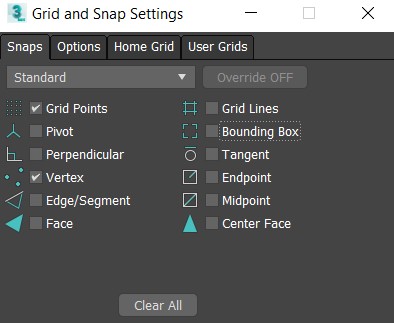
Hello, I'm quite new to blender but already notice some major disadvantages with snapping. Unfortunately you can't snap to the grid and the vertexes at the same time. For instance we have great snapping settings in 3ds Max. Is it possible to do the same kind in blender? To have ability to snap vertexes and for instance grid at the same time. Please, check the videos I'm talking about: 3dsMax: drive.google.com/open Blender: drive.google.com/open
I hope you'll take it into account
Best regards, AndrewAlexArt
11 Comments
Would also like to see the ability to change snap mode while in mid-edit to different settings. Ex. Change from grid to vertex centered with hotkey.
In dropdown Snapping panel click on
Vertex+then ( with shift ) onIncrement+ checkboxAbsolute Grig Snapalow to snap to not just incremental grid but actual global grid. InViewport Overlaypanel you can customize grid* @IIIFGIII * Unfortunately it is not working properly. It takes middle point of selected vetexes, but not a desireable vertex Video: drive.google.com/open . Any ideas?
* @Andrew Alexandrov * It take
Pivot Pointwhich you select... Man - sit still and learn Blender something like at least few month before going somewhere and starting " proposing " to add something what is already exist....Good start point is Youtube, forums,
Blender Stack Exchangefor asking questions. RCS is for actuall suggestions, not for free tutorials...* @IIIFGIII * ok then, how could you explain this? drive.google.com/file/d/1mEGNnmuFZ_U_L_zdCK3K_NgyOeNA7Wrz/view
* @IIIFGIII * before the start of this topic I asked my bro who worked with blender 10 years. Unfortunetlely he didnt know how to do that. It works good with extra click to active vertex, thanks! One small question, how do you swap active vertexes without clicking to them?
* @Andrew Alexandrov * Increment snap is not just some snap to 2D flat greed. First of all it's for "incremental transforms. If you want to snap to XY space press G + Shift Z ... Everything is work as expected.

* @IIIFGIII * Thanks for your reply. It helped a lot!
ATTENTION please! I also noticed very strange thing and it loks like a bug. I trying to snap the cursor to the grid, but it completely avoiding the grid... Video: drive.google.com/file/d/1mEGNnmuFZ_U_L_zdCK3K_NgyOeNA7Wrz/view
Welcome to Blender!
One small note about this site: it's usually not really sufficient to post a link to a video or image of another application and basically say, "Make Blender like this." This site is meant to have more flesh-out proposals with mock-ups of what you'd like to see in Blender's interface .
That said, the proposal you've made is reasonably straight-forward. I'd just recommend keeping this in mind on future proposals.
* @Jason van Gumster * oh yes, sure. I did not mean that the settings should be exact the same. I just meant the key feature that could be extremely good to have and included the video to clarify this