
3dconnexion also controls objects
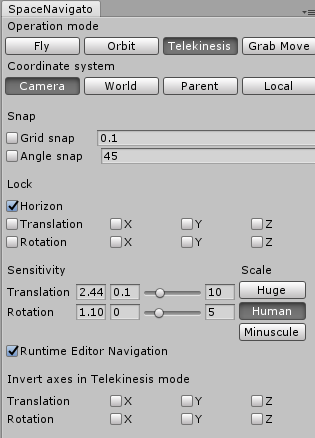
Hello, I love 3dconnexion in Blender, but also being able to move objects with it makes it 100 times more useful for productivity. I attached the cube to a camera which is controlled by the 3dconnexion for an example that is possible but in Blender already but just in a hacky way. There is a very good open source version of this available for Unity, so I was hoping the code might be adaptable. github.com/PatHightree/SpaceNavigator Here are the options it allows, 1 Fly, is the same as Blender. 2 Orbit, Blender also has this. 3 Telekinesis, this Blender could really use, its moves the objects. 4 Grab mode, this it like one but the object moves with the camera.
7 Comments
Below the difference how 3dconnexion works in Maya and Blender.
Autodesk Maya 2018 media.giphy.com/media/4KEM3aqCikHPE5S3ka/giphy.gif
Blender 2.79a media.giphy.com/media/toYHw82XbUwINuUHT4/giphy.gif
@topixon: Interesting how smooth it is in Maya though if you select over 100 poly with softselect (proportional editing) then the 3Dconnexion lags behind use. I don't think my gif is working but i was trying to show that you can move objects (not just the camera) which is VERY VERY handy.
Actually, in my opinion 3dconnexion in Blender works much worse than in Autodesk products. For example, in Maya, we can rotate around a selected object or part of it. It is super comfortable and intuitive. In Blender, I can just fly around the stage like a ghost. A similar experience to move while working at Unreal Engine. It does not matter what element I have selected. For this reason, modeling one object is easier, faster and more convenient to move around in the Viewport simply with the mouse.
Maybe I have something wrongly set in the options, if so correct me. I love how the controller in Maya and Max works.
@topixon: Thats Orbit mode its under Preferences-Input-Navigation Style. 3Dconnexion use to have a handy menu pop up attached to the left button but haven't reset that up on my new rig.
Thanks, I will use the Orbit mode instead of Free. The controller can sometimes be useful. We'll see. :)
In my opinion, the difference between 3dconnexion in both programs is colossal. It is evident in Blender has been treated neglectfully.
In Blender, you can either rotate comfortably around one object or move around the scene less comfortably. Both can not be used at once. If you edit some element of the mesh and want to be able to rotate around, you have to every time press "Numpad." otherwise you rotate around the object not an element of it. The keys placed on the controller do not do anything. Even the default one, set for example, Undo, Retro, Front, Back View.
Unfortunately, 3dconnexion doesn't treat Blender users seriously.
@topixon: They never have. I've asked them about this several times.