
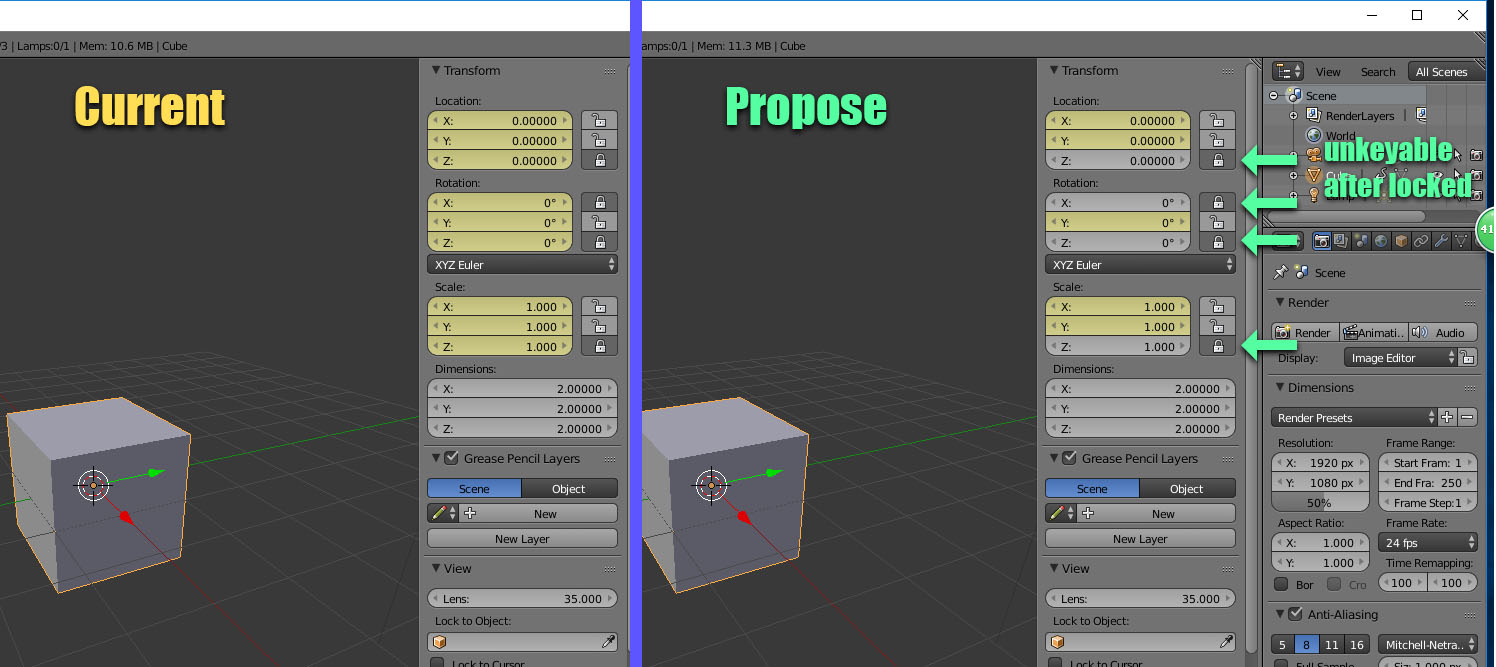
An option to Make a channel keyable or nonkeyable using lock
By default, an object's Translate, Rotate, Scale, and Visibility attributes are set as keyable.
Current Blender allow us to key single attribute, but it will key all (X,Y&Z), what if we only want eg. X&Z only? I propose an ability to use lock to make it become nonkeyable.
It all be a great help for complex rigging for animation.
Why?
- Different object can have different attribute. (Yes, by default we can use "Available" for this, but at 1st we need to manually set all up)
- Cleaner Dope sheet.
- Lock & unlock to switch nonkeyable or keyable if needed.
- Easy to manage to selected animate object even though the Active keying set is “LocRotScale”
17 Comments
I completly agree with that. Animation in blender is archaic and dirty, I had the chance to see that when i started doing animation in studios that use maya. I hate autodesk but blender has huge holes in its animation pipeline. How do you wanna properly edit your curves when all the junk you don't want is displayed? Yes you can hide it, but with big rigs it becomes time consuming as we have to start this process over for every new animation. It's a shame that most blender users don't seem to care about animation tools. with the recent partnerships and the fact that ubisoft anim studio will move its pipeline to blender, they will bring addons or proposals in order to fix this part of the software.
Or... Set your keying set to "Available" so that when you press <kbd>i</kbd>, it creates keys only in the available (meaning already keyed) channels :
Also, if you keyed an unwanted channel, at some point you're supposed to clean your keys via Blender's key cleaning tools, which include a channel cleaning.
@loic.dautry: Thanks for reply, yes I knew this, as mentioned 1st we need to manually set it one by one, which is very tedious.
In your proposal, you also still have to set it at some point. But the issue is that if you need to actually key at a specific moment or simply if you want to lock the channel but not prevent the keying, your proposal adds extra steps.
@loic.dautry: Basically if you lock it, it can't be keyed, we can unlock later to make it keyable if needed.(which is not often)
@loic.dautry: Normally we will do the locking in rigging stage, then is done. Futhermore, we won't accidentally move the unwanted since is locked.
Hi there, I'm new to Blender and stumbled upon this discussion via Google. It seems that this functionality is not yet built into Blender. Therefore, I've created an Add-on to address this. You can find it here: github.com/jiapeiLu/blender
I'll continue working on refining this. If you have any questions, feel free to leave comments.
The problem with most of the existing solutions is that they require at least 1 key to exist on the channels. I agree it would be nice if you could set some channels, or properties to "non keyable" in certain cases. But for now creating a zero key on the channels you want on the rig works, it's not the most elegant solution.
Saying you can clean unwanted keys up later is a workaround, not a fix. A fix is being able to prevent the mess happening in the first place. The underlying issue here seems to be that Blender can't seem to restrict keying to only what you're actually animating. If you rotate a bone on the local z axis, you expect only to get a key on the local z axis, especially if you've locked the other axes. Instead you get x, y an w as well- and that's only if you've restricted your key set to rotation, otherwise you get position and scale keys for every axis as well. That's up to a dozen unwanted things being created just to get the one thing that you did want! Time is money in a production environment, so wasting time having to clean up things you didn't want created in the first place is most definitely an issue.
this needs more up vote.
Isn't this basically what keying sets are for?
@Jason van Gumster: We can't on & off key in Keying Sets, , lock & unlock can if needed.
But locking a channel is not supposed to prevent keying it. What if we want to just lock a channel and still key it? What if we want to not lock a channel and not key it? It's never a good idea to use a specific function to do another one. Never. And you can toggle keying sets, what's the issue ?
I know this is a very old thread. But today I've stumbled upon this issue. As far as I learned, I can set something to a keyset "rotation location". But what if I want to have the one controller to be keyable only for translation, and the other only to rotation z? And the main controller to rotation, location and scale? And in the end, when animating my character, I want to select all, press "I" and have the whole character keyed on frame 95. With all the channels I do want to be keyed, and not the un-used ones (for more clarity in Graph Editor). So totally great would be if I could set the keyable channes while rigging my character!
There is an option that would allow you to do exactly that in the Dope Sheet or Graph Editor, but you need some animation data to see it (at least one key).
@aresdevo: I know, but in order the lock in Dope or Graph, we need the key, and the list remain long.
@lhc268: I understand your point