
Sculpture Mode - Quick box customization
Proposal for quick box customization of Sculpture Mode Tools
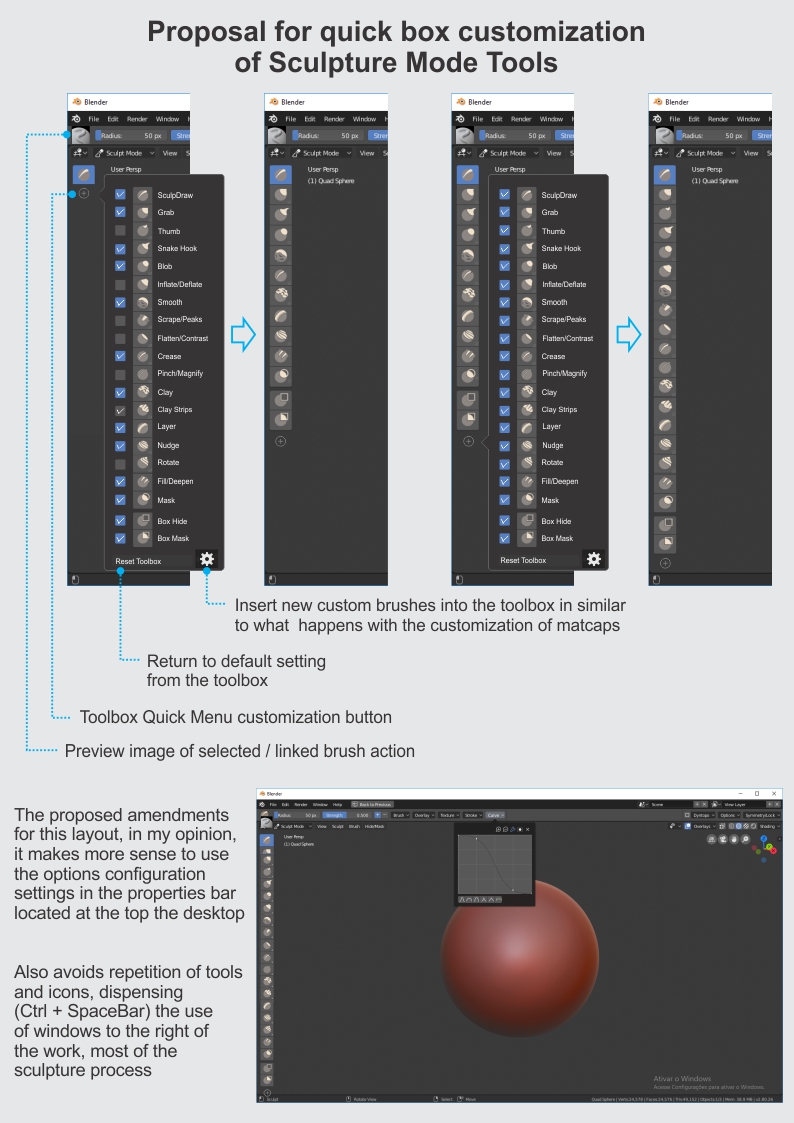
This idea was marked as a duplicate of Horizontal Toolbar Support....
Proposal for quick box customization of Sculpture Mode Tools
5 Comments
it's a great idea, blender lack of customization for tools, it would be so useful
Marking this as 'Duplicate' since this is in development with the Asset Shelf region.
its a good idea, would be great if u can also set 2 or more columns and drag the icons around when in the customize mode, so one can organize the brushes as it best fits his/hers workflow
Good idea. Idk there's something about that brush palette that kills me inside. Maybe it's the icons
@theobairon16: I agree with you.
Firstly because some important brushes are hidden, nesting as if they were part of a subcategory (ex:). This approach works well in photo editing programs and vector drawing, for example, but it does not work for sculpture because changing brushes is frequent and contentious. The way it behaves today irritates the user and makes it difficult to use the sidebar of brushes
Secondly, the icons can not identify the results of the brushstrokes so precisely. But this is not a flaw in the design of Blender icons (I think they're very pretty). It turns out that all programs I've tested, such as Modbox and Zbrush have the same defiance.
It's really hard to identify carving strokes with only 2d drawings, so I suggested replacing the brush icon found in the above property bar with the same linked image in the Toll Settings window. Incidentally, Blender may well use actual captures of brushstrokes for these Toll Settings links.