
Proportion lock.
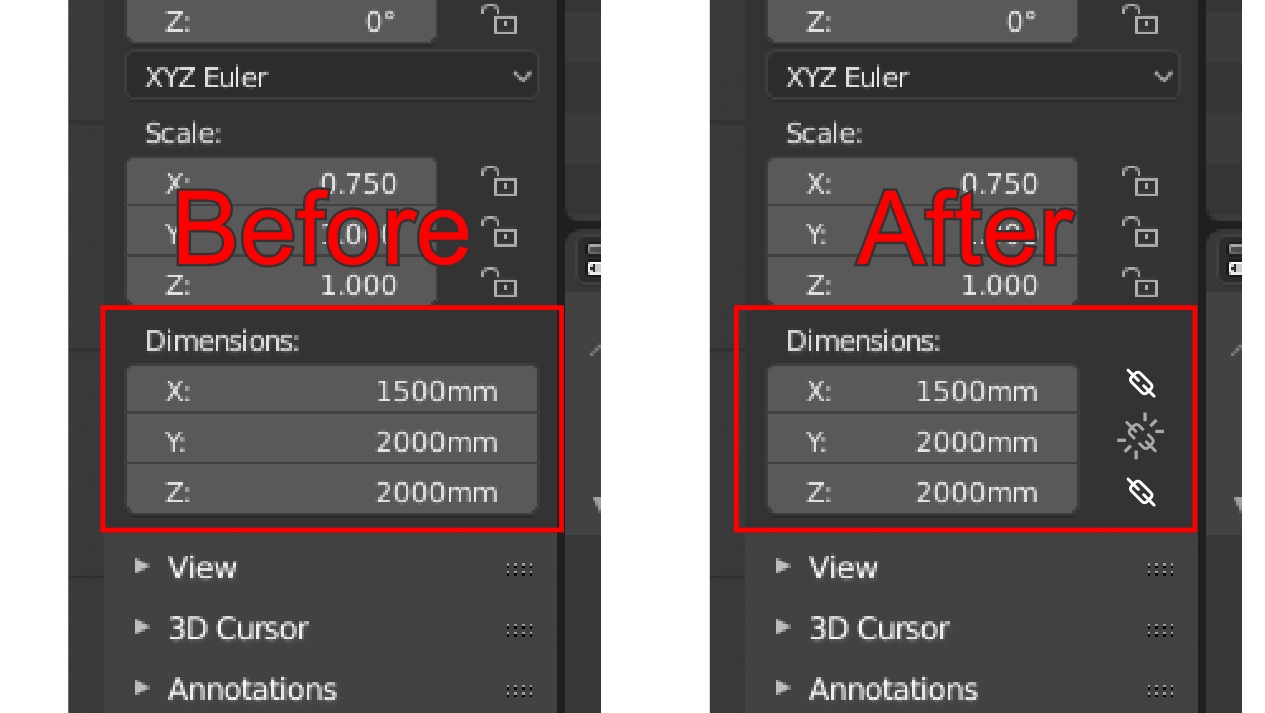
Hi. I very much miss possibility of blocking proportions when manually typing sizes in the 'Dimensions' tab. As you can see on the right side of each value there is a little space where the appropriate icons could be placed for this purpose. What do you think? Thx
4 Comments
I might suggest that "Linked" is a better adjective as "Locked" suggests "Doesn't change"
You're suggesting that, in your example, if I change X to 3000, then Z will also double to 4000?
@ammusionist: Yes, it will be correct Z value which will result from calculation of the proportion.
Those can't really be locked, since they are also affected by changes in the Edit Mode and by modifiers. The only thing that you can lock about it is the slider itself - but I don't really see the benefit of doing that.
@Simon Storl-Schulke: Actually, I meant a mathematical function which automatically determines the proportional value based on the number entered manually by the user. So this does not mean blocking value but a proportional recalculation of the "locked" axes when user enters value.
Below the gif showing how it works in the corel, the same principle i.imgur.com/PmaiLrT.gifv