
Modifier Favorites/combos
So currently you have to add modifiers one by one, then change their parameters one by one, unless you copy the modifier or transfer it from another object.
I´ve been using the great modifier list addon, which besides replacing the stack for a list also lets you add favorites to a quick button list and configure settings presets so you don´t have to change them manually everytime.
Just having the presets would be a nice feature to have natively in blender, also being able to save combinations of modifiers as favorites would be extremely useful (i.e. boolean+bevel or array+curve+subd, each with their own preset settings, all in one click) .
Custom modifier combinations are a common plugin theme and it shows how useful this feature is. Having some sort of quick access buttons would be necessary - an example from the modifier list addon:
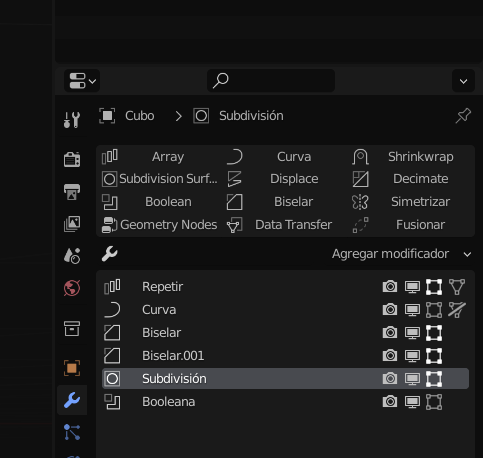
(Extra points if we can assign keyboard shortcuts or a pie menu for the favorites list).
Not everyone wants to install a plugin with a ton of features that will never be used and that will add more clutter to the siderbar! So having a built-in way of saving modifier presets and combos would go a long way.
I´m sure someone will say "you can do this with geometry nodes" but I think that defeats the purpose here; adding a pre made node as a modifier through the asset browser doesn´t seem to be as fast as having a list of buttons right there in the modifier window.
2 Comments
yes yes😃
This is great. Some time ago I was thinking something similar, but for it to be used as GeoNodes fav list or presets. I might do some designs someday...