
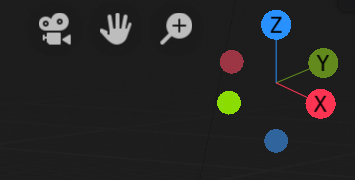
Shift-Drag the Navigation Gizmos for precise control
EDIT: The earlier version of this post used the word "incremental" in a confusing way. I meant incremental as in "by small amounts", not as in "in fixed units".
In many of the fields in Blender, you can hold down shift while dragging to get more precise control.
It would be nice if the Navigation Gizmos supported this. (The main use case for me is when I'm moving the camera into place, I often want to make very fine-grained adjustments.)
10 Comments
In Blender, <kbD>Shift</kbd> is used for decreasing the sensitivity of an action. It's <kbd>Ctrl</kbd> which is used for incremental (well, it's actually using whatever snapping option is set up, which is set to incremental by default).
* @-L0Lock- * This. These controls would be nice, but for consistency, should fall in line with what the rest of Blender does.
* @-L0Lock- * My mistake! I thought it was the other way around. And yes, consistency is better.
Title should be "CTRL-Drag the Navigation Gizmos"
* @richardhnoble * You should be able to edit the post and the title yourself, since you're the original poster.
Having just checked this, I realise I did actually mean Shift.
My choice of the word "incremental" was confusing. I meant incremental in the colloquial sense, "small amounts", not in the sense "a series on a fixed scale".
Apologies for the poor wording.
* @Jason van Gumster *
I noticed this too. Incremental orbit control from the navigation gizmo would be useful.
('Shift-Drag' might be more exact than 'Shift-Select'. just a thought :)
Good point! I've corrected it. * @CandleComet *
I made a similar post about this, would really love to have this feature! Link
This reads like a UI papercut. Maybe you should also post a topic at devtalk?
* @Josephbburg * I just did, thanks :).