
Curves in Poly mode: "tilt your selected control points to a defined axis"
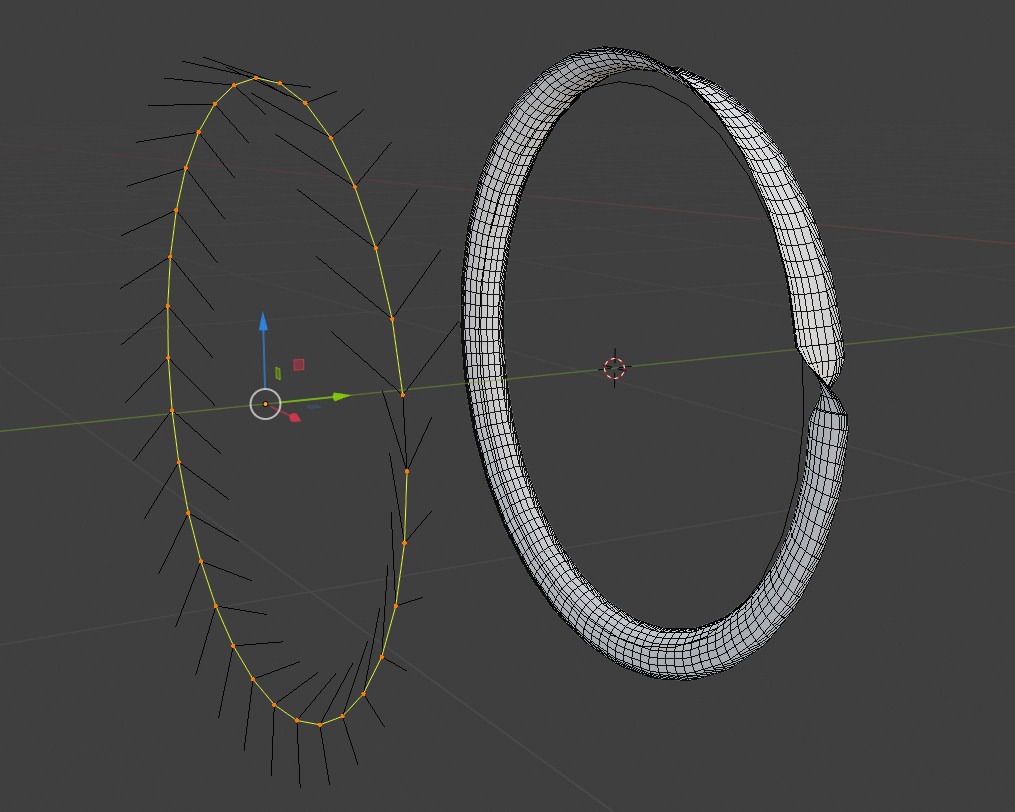
As the title say, that feature it's needed because tilting control points one-by-one become really tedious when you have that "twist" issue from my pic. That happen using "Poly mode" and the workaround in that case was "apply transforms": but the user shouldn't be forced to "apply transforms" during the middle of a workflow, and yet a "tilt your selected control points to a defined axis" it's really need nonetheless considering that could be the workaround for many other issues that couldn't be resolved with "apply tranforms".
(if the mentioned request is already implemented in Blender, well, it seems to have been very well hidden to make sure it will never be used lol)
3 Comments
I agree, although there are other issues associated with this.
Trying to control the tilt of a curve object is a nightmare, and it's mostly because tilt is handled as a floating point rather than a control point.
A good place where this is obvious is with hooks. Hooks should be able to control tilt. But actually making them work requires drivers and control structures to correct the tilt.
The one advantage that using tilt as a floating point number is that it allows tilt outside of -180, 180 range. But that can be handled by using a combination of a tilt-to point and an integer "tilt iterations" count to add or subtract multiples of 360 from a tilt-to.
But the root of the curve's tilt are not affected by the next(+1) curve point, it is possible to make every curve tilt independent just like the root? (Other people has mention you can switch direction to preserve tilt while editing)
I usually reset the tllt at this point.