
Viewport wireframe AA improvement
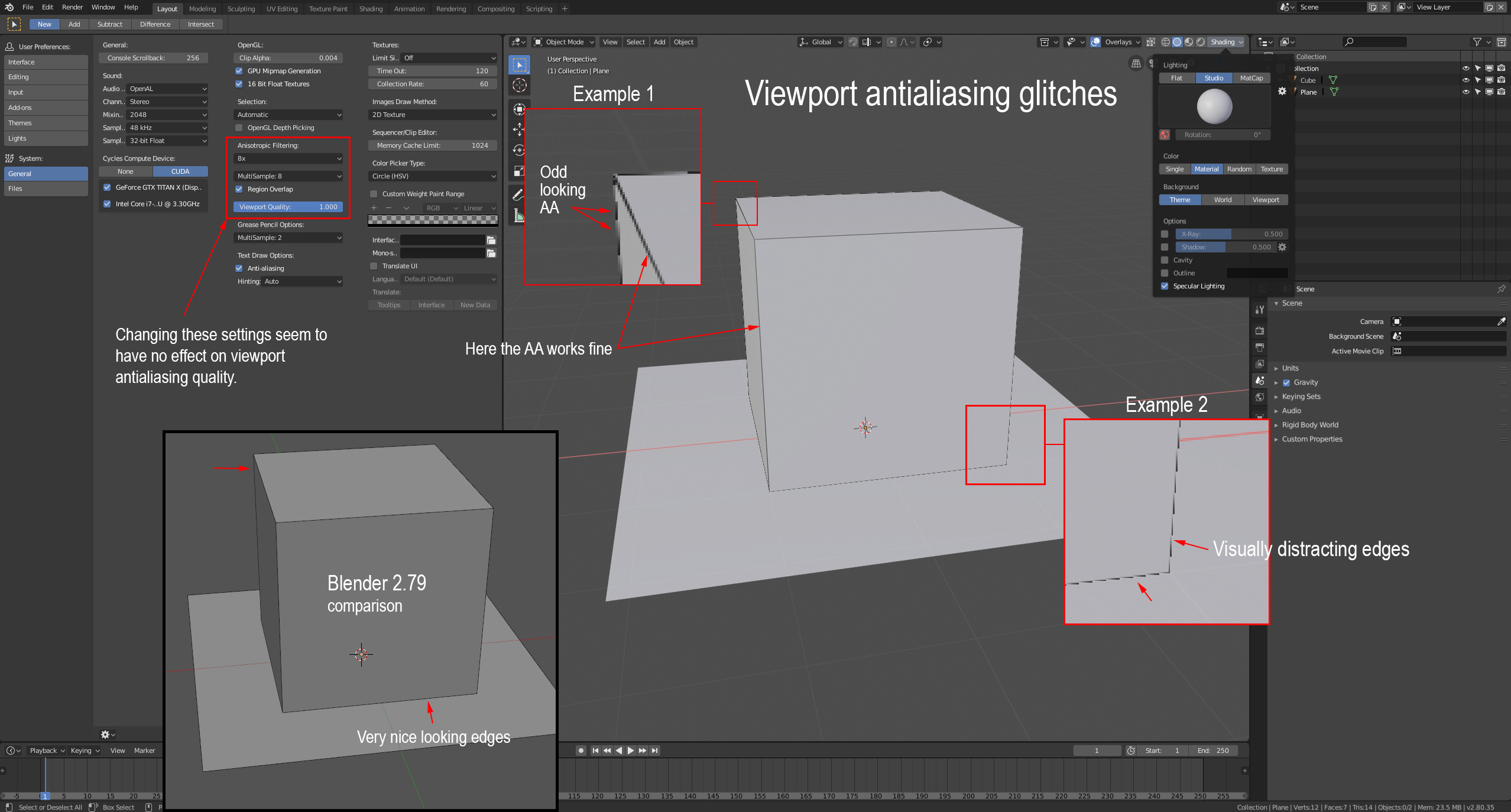
Viewport antialiasing in Blender 2.80 Beta seems to not work correctly. In comparison to Blender 2.79, which has very nice edge rendering, the current 2.80 Beta version produces some quite visually distracting results. If it is possible to achieve the same quality as in 2.79 that would be very nice, and make the viewport experience much more pleasant to work with.
4 Comments
This needs to be fixed asap. I have the same problem and I literally cannot work.
I don't have the same jagged edges as you're showing, but I noticed that during rotation or movement or anything that changes what is displayed in the viewport, the edges are a bit jagged, but not to the point that you're showing (I barely noticed it). The AA seems to be applied only when the viewport becomes static.
I tried changing the three settings that you marked in the image and I didn't see any difference except for the Viewport Quality, where 0 looked exactly like it does during movement (with slightly jagged edges) and 1 basically looks fine.
No clue where your problem lies. Maybe it's a graphics driver issue. They did bump the OpenGL to version 3.3, so maybe something broke for older cards or integrated graphics.
@Alexander Chaplin Braz: As you can see in the upper left corner of my screenshot, I am running Blender on a GeForce GTX Titan X card. Pretty solid card that should handle this with ease. However, if you have "outline" in your Shading-menu checked ON, the effect I documented above is less apparent. I checked the issue on a few other pcs at work and they did indeed have the same problem.
@csveen: Ah, sorry. Didn't see that your card was shown there.
If you're running that sort of GPU I'll have to assume that the monitors it's powering are also of really high resolution (same with the other PCs at your workplace). Maybe it's some sort of issue with scaling the overlay for high-DPI displays. I suggest you report it as a bug since it doesn't seem to work as it was meant to.
Edit: I was finally able to notice it in edit mode when an edge is selected. The orange overlay is quite jagged and the black edge can be seen under it.