
Move Micro Displacement Settings to Displacement Node
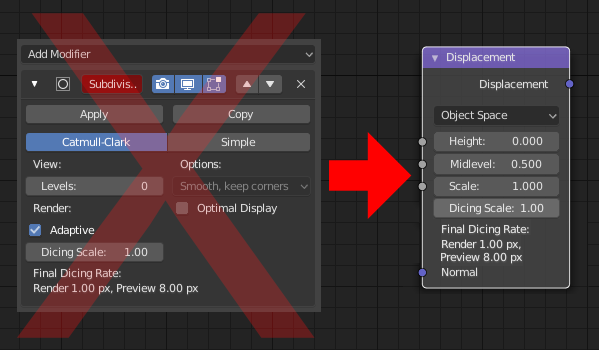
I would like to propose to move the settings used for the "adaptive micro displacement" from the "subdivision surface modifier" into the new "displacement node" used in the "shader editor".
It seems kind of redundant to have two areas to attend to.
As it is now, you have to separate meshes into different objects if you want to only displace one part (think "trees", where you only want to displace the stem's bark, not the leaves).
8 Comments
So, why not in the material properties, right there where you choose Displacement/Bump/Both?
@Lsscpp: In 2.80 the default is "Displacement only". So you do not even need to touch those settings. You have to, however, definitely add a displacement node. Also, for me, it would just feel more "right" there. But yes, it'd make more sense there than how it is solved now, too.
@Gustav.Krause: I wrote it, because it would be odd to set dicing in node-editor, but being able to override the displacement (set to bump) somewhere else in the UI
@Lsscpp: You do have a point there! But that got me thinking: Do these settings really need to be there? They could be removed and Blender could handle that stuff internally.
If a displacement node is connected, set the setting to "displacement only", if not , put it on "bump only". If a Principled BSDF is plugged in with a bump/normal map plugged in AND a displacement node is pluggged in, too, set it to "both". (Or set it to "bump" by default and "both" when a displacement map is connected?)
No need for the user to set this manually every time? Else, I would love to see that drop down moved into the node, too.
I think it should stay as it is because it's related to mesh manipulation not material.
@mikhail.gavrilec: no, the micro displacement only takes effect while rendering. you are not actually changing the mesh.
@Gustav.Krause: I thing you got it wrong. The dicing is a property of the mesh, not the material. And what if you have a bunch of materials on one mesh? You would need to tweak this setting on each material.
@Yegor Smirnov: I would argue that the dicing is a property of the mesh at all? Its a property of the material it represents, e.g. how coarse it is (or isn't). I would welcome the option to tweak these settings per material. This way you do not waste resources because you have to set it uniformly to fit the part that needs most tesselation.