
Making Overall Node Editor Timing always visible in the node tree
Recently I am working on big Geometry Nodes trees, and I want to know how every change is impacting the overall performance. For example, I change the count of "Resample Curve" at the beginning of a node tree, it must cost performance downstream.
Currently GN is showing an overall timing of that node tree on the top of "Group Output". However, in a big node tree, It's difficult to zoom out, go to the end of node tree, and zoom in to check timing, and zoom out and go back to edit the node tree.
There are many workaround to solve this problem. The easiest workaround probably is to add a new group output to check the timing. However I don't think it's feasible all the time, as adding a node itself will likely enforce a new evaluation of a node tree, which may take a long time unnecessarily.
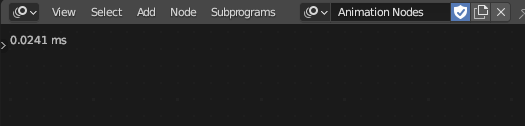
Animation Nodes has its global cost of timing always shown on the left upper corner. I hope this UI change can be made similarly in Blender.
0 Comments