
New Video Editor & renderings simplification
New organization for video editing and rendering
[Translated from French]
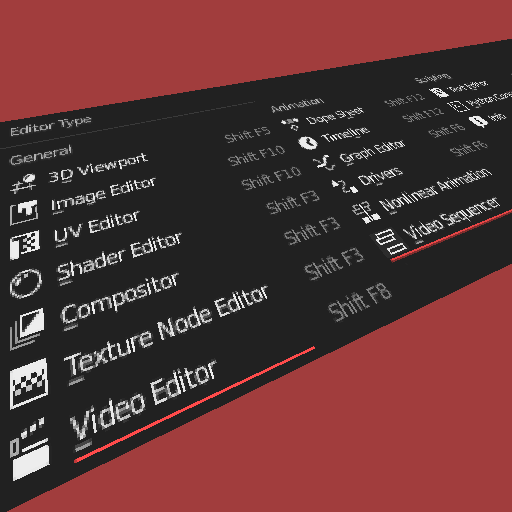
Video Editor
The blender image editor is complete and allows you to navigate between the different images imported into the different blender editors. All manipulations that must be performed on images is done in this editor. (Except for the UV editor who is in a new independent editor for a unknown reason for me.)
The problem is, when you start using blender for animations, the video preview are not used for this purpose but only for the preview of sequences.
The idea is to make for the videos that what has been done for the editing of images. (Quite simply.) All movie clips imported into blender can be viewed in this new Video Editor. The timeline would be very useful for traveling in these movie clips. The time 0 being the time 0 of each of the individual sequences. I solved the problem of the rendering time limit, which I mention it later in this document.
Here, two slot automatically generated will have to be available: A slot “Render Result” for the final rendering with the Compositing and a “Sequencer Result” which will be the real-time result of the Video Sequencer.

Render Animation
Such a video editor makes it possible to render animation renderings directly in the blender interface, but also most importantly, to view them without an external player ! Needless to say, access to histograms and other tools becomes very relevant to checking animation renderings. The display of an image or animation rendering will be done simply in the appropriate editor. The video editor can integrate in addition, a TimeLine to simplify the playback.
Vidéo Sequencer
The sequencer deserves to have its own editor like all animation editors such as Dope Sheet, TimeLine, Graph Editor and others. A new Video Sequencer, now located in the “Animation” type editors. I notice that, a lot of people are separating the sequencer from the video preview due to an integration of the Timeline. It is not interesting to keep them like that.

Use Preview Range
The essential problem for the Video Editor and Movie Clip Editor is the frame mapping of the final rendering. The current option allows to do this but is rather restrictive. It should be automatic and used in the other way. (This option is currently unused by the Movie Clip Editor timeline) If the current video in the new Video Editor is a 400 frame movie clip and the “Use Frame Mapping of this movie clip” checkbox is checked, the video is played back to its real length, ignoring the global frame mapping. Automatically, the “Use Global Frame Mapping” option is disabled. A frame mapping status is displayed in the movie clip list. If you select the “Use Global Frame Mapping” checkbox, all frame mapping by movie clips are removed. One can also do so that when creating a rendering, the frame mapping of movie clips are simply ignored. This will simplify life for many people, especially for the Movie Clip Editor. The main advantage is that we do not need to know the exact length of a Movie Clip.

Movie Clip Editor and other editors, sometimes identical
Optionally, the editors present in Movie Clip Editor can also appear in the new Video Editor but since the UV management is no longer in the image editor, I guess this idea will not be retained. I would add in my favor that a larger number of editors is actually good for the customization of interfaces, on the contrary, the categorization of tools is more and more confusing for new users and pro users. It is sometimes difficult to understand why we need to change texture nodal editor to find a similar nodal editor but for a shader. Editors should only be changeable in the case we need to radically change the way of working. For example, it seems obvious to me that editing a mesh would become problematic if it was in a different editor than the 3D Viewport. In the future, perhaps the editing of a procedural texture could be achieved by simply pressing tab in the shader nodes in the same way of the 3D view's edits mode to navigate faster between the editors.
Et voilà...
5 Comments
Some, but not all of the ideas suggested here are duplicates of existing ideas (For instance, Frame Mapping).
Can you please split them into separate, granular suggestions that can be considered independently?
I can not break down this article. The reason is simple. All the tools presented here respond to the new organization and are therefore mandatory for the proper functioning and consistency of all these tools. Developers need a clear vision and not a proposal like "do it" and do as you can for conflics with the other tools.
I would name this post "New organization for video editing and rendering" rather that "animation editing and rendering" because you don't edit the animation there, only video & audio data. You can render an "animation feature" via blender scenes, but then "rendering" includes this anyway. So it makes it more clear with "video" instead of "animation" and avoid people reading the post list thinking you make a proposal about animation editors while it isnt.
TL;DR: video.
Thank you for your comment. I changed the title. I am French and it is the words that are used in the software. "Render Animation" is for a new video content or sequence of images visible in my new "Video Editor". I thought it would be understandable. But sometimes, the proposals must use other more appropriate words. It's always a bit difficult for a stranger to the language.
* @valentinwn * I'm French too and I would like to know which software uses "animation" like that. x)