
Wireframe Shader With No Tessellation.
Problems With Getting A Quick Wireframe Render
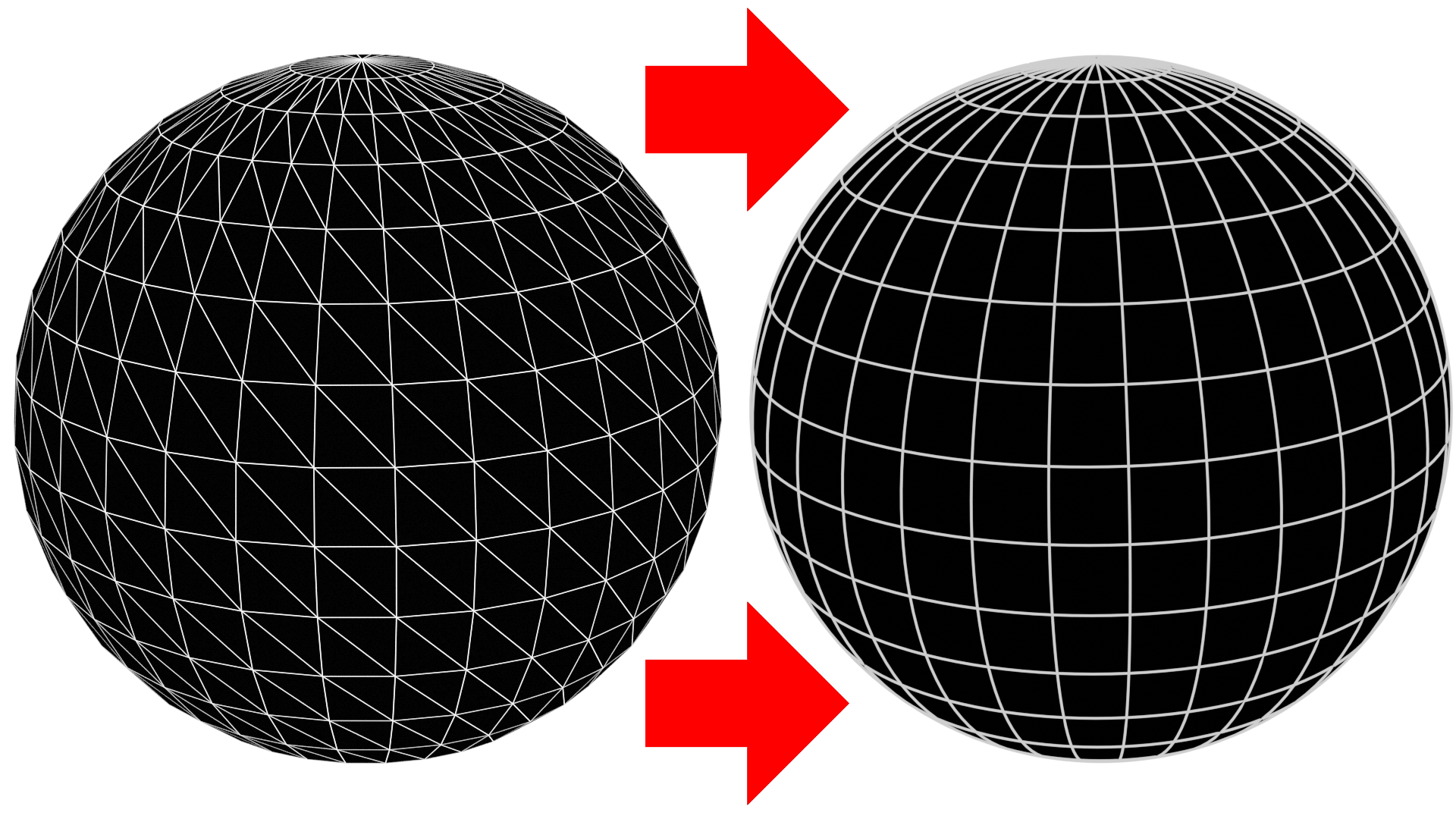
Right now, Blender has a wireframe shader, but it tessellates all the quads in your meshes. Sometimes you want this, but often when showing off topology, you just want all quads. I've found people often avoid using this shader because of this. A quick YouTube search of "blender wireframe render" will result in a ton of "workarounds". People using the wireframe modifier, people using freestyle and highlighting every single edge, using dot products of normal and true normal, even using a viewport render with a lot of tweaks which I saw being taught on CGcookie.com .
These all work in their own way, but I can't help but feel they are just beating around the bush.
Suggestion
I think it would be nice if Blender came out of the box with a wireframe shader with a toggle box that switched between having a tessellated mesh, which we currently have, and the pure geometry. This way there is no need to muck around all these techniques as much.
Stretch Goal
Perhaps even having another toggle box for "use modifiers". This way you can chose to ignore, or use a subdivision modifier, for instance.
10 Comments
This is very needed for uses like showcasing your topology
I desperatly need this!
Yes I'm here from having used another workaround. I want to replicate 80's style vector 3D graphics, so I would like a per object wireframe line thickness that stays the same size no matter the distance from the screen as if being drawn to the screen using 2D line drawing functions (and the wireframe render does give this effect) but NOT show triangles (which wireframe can't do.)
I ended up adding a driver to the size of the wireframe modifier that would change the wireframe thickness relative to the camera distance - to keep the wireframes the same size on the screen no matter the distance. But that won't hold up if the object is very large since the distance is taken from a single point and then the wireframe size is applied to the whole object evenly.
I agree. Maybe this shader will work for you. Greetings.
I am not 100% sure, but I think cycles and viewport are both using a different mesh. So cycles is using the converted mesh to wireframe (triangulated mesh) and viewport what it can see, that is that quad mesh. Someone who knows better might be able to clarify this or correct me. :P
Use Freestyle edges: blender.stackexchange.com/questions/314535/
This effect can be achieved by using "Freestyle" line rendering. Here is a tutorial about it: youtu.be/_QVNIEP1E5M . Make sure to check all the settings in the View Layer Properties to customize your lines. Also, it will only be visible on the render output.
Do you know if what has been commented has been implemented?
This seems to come up a bit. This is definitely needed. I was going to write this proposal as "Wireframe Node with Quad Rendering" (and N-gon).
This is very needed!