
New select modus: 3 Point Select Box (angled select box)
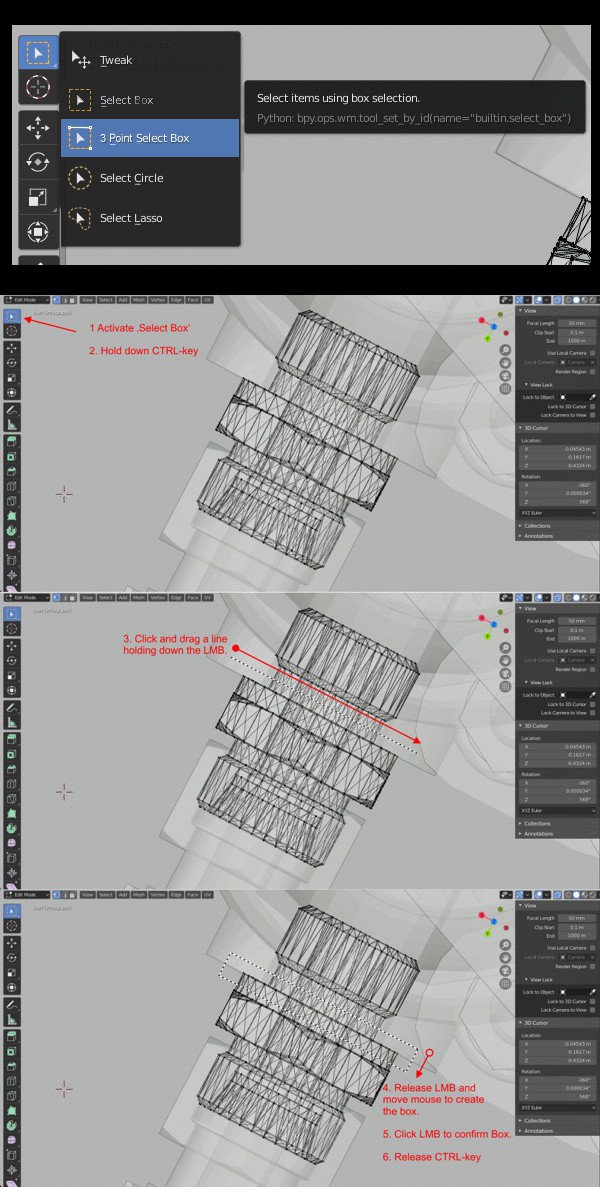
In edit-mode, I often have to select an angled row of vertices. With the 'Select Circle'-tool it can be tedious to select the necessary vertices only. Therefore, I would like to suggest to extend the 'Select Box'-tool with a 3-point-select modus.
My idea is that the tool can be used holding down the CTRL-key while the 'Select Box' is active.
You can draw a angled box in the same way as drawing 3-point-rectangles in e.g. Solidworks or Corel Draw:
- Activate 'Select Box'
- Hold down CTRL-key
- Click and drag a line holding down the LMB.
- Release LMB and move mouse to create the box.
- Click the LMB again to confirm the box shape.
- Release CTRL-key
4 Comments
This is just "Polygonal Lasso", but with fewer options.
IMO a true Polygonal Lasso would be superior to this idea, sorry.
* @jeric_synergy * In addition, true Polygonal Lasso would be great too. But in case of polygonal lasso you have to click 4 times for a rectangle instead of 2 using '3 point select box'. The use is slightly different. It's best to have booth! :D
* @Steve Moore * , it's clever, but too convoluted imo/ymmv. I often find that with polygonal lasso I don't need a rectangle per se, just a long skinny triangle.
Additionally, I often want a series of rather squared off regions, ie multiple rectangles, which polygonal lasso does easily.
I appreciate the effort, but am not swayed. But the voters will decide. Good luck!
looks like a good idea