
Proper paint of separate RGB components in channel packed textures (ORM)
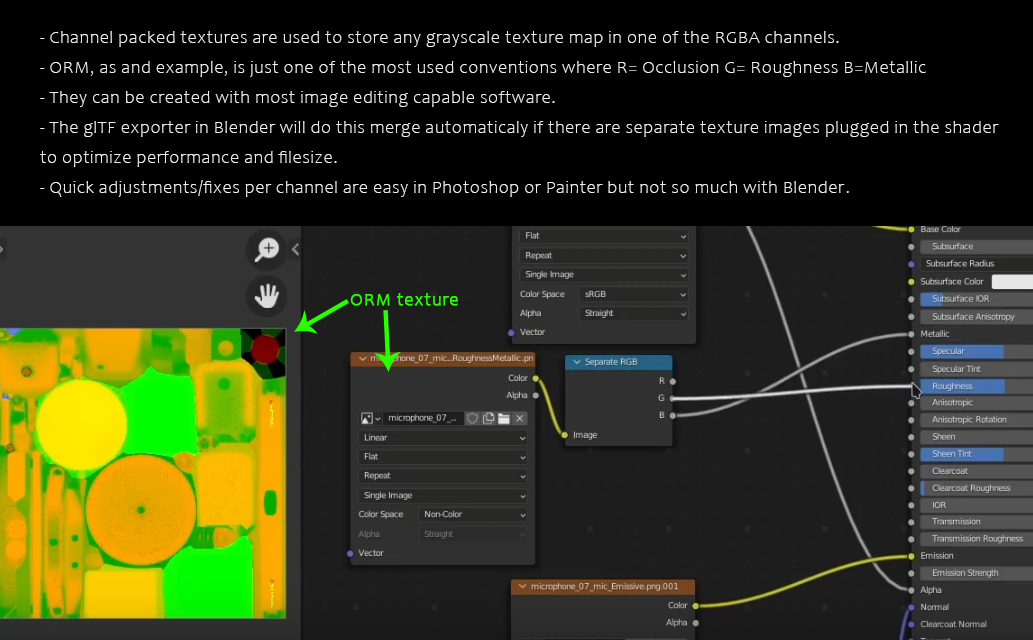 Game assets and webGLs use different grayscale maps packed into rgb channels for optimization.
Currently it is possible to paint on separate channels by setting to 0 the other two channels and switching to Add blending.
But with Add you can't constantly paint with the same value. On a second stroke it will be double the value.
I propose that in texture paint mode, vieweport top bar options should offer an RGBA selector similar to Image editor and in adittion to be able to pick and paint grayscale values on the actively selected channels. An easy toggle for displaying the active grayscale channels in viewport would be a nice addition for inspection.
The benefit of having this in Blender instead an external editor is reducing a lot of time moving data and the advantage of face selection masking that is otherwise cumbersome to transfer to Photoshop for example.
Note that the 2d Image editor's channel selector is just for display purposes now, painting will affect all of them with ususal Mix blend.
ps: I'm almost sure this has come up before but was not able to find it.
6 Comments
Instead of following the Image Editor's channels viewer, which only lets one select RGBA/RGB/A/R/G/B, I'd rather have four checkboxes for the RGBA channels, allowing for selecting multiple channels, such as, say, GA.
(This is a real use case for me: a game where the normals are stored in the Green and Alpha channels, while the Red and Blue are for opacity and emissiveness. I can't clone normals if I can't select both channels)
Can you add some reference pictures to illustrate the way the images are used in the Game Assets and WebGL you mentioned? I am intrigued by how this could be used aside from just a diffuse texture map.
I hope this makes the concept clear.
Packing the textures like this allows to have just one image file and use each channel as a different map, so you can have one single image file where 3 maps are stored; the AO map is saved on the Red channel, the Roughness on the Green channel and the Metallic on the Blue channel.
Interestingly enough, Gimp allows you to access the color channels to paint separately with the simplest of file types so this should be possible - but I do think that the implementation will include some kind of color separate and color combine for channels as well in the shader nodes - and I'd really like them to also allow for compositor nodes too so we can do filtering and adjustment and combine the images into one there separate from the shader work.
There is a game I'm dealing with whose packed image files contain information such as:
R - Opacity.
G - Normals component.
B - Emissiveness.
A - Normals component.
R - 1st colorizing mask.
G - 2nd colorizing mask.
B - Reflectivity.
R - Ambient Occlusion.
G - Hue.
B - Saturation.
A - Lightness.
Et cetera.
Something that often dictates what channel gets what info is the image compression scheme in use, which can be more lossy in channels whose color is perceptually more tolerant to that. Typically the alpha is the less lossy.