
Not having to delete all videos from the VSE in order to render with audio.
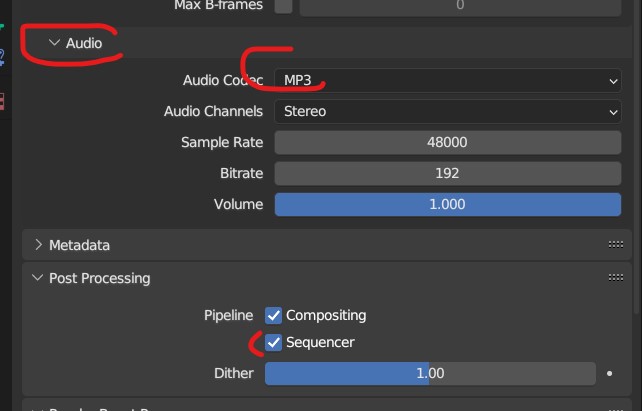
Currently it's impossible to render (3d scene, not video editing) with audio if there is some video in the VSE. The workaround is to delete all the videos from any track, render, DONT FORGET TO UNDO a while after, once the rendering is done.
(if you deactivate Sequencer in Output > Post processing, the audio will not render, and if you leave it active, while there is a video in the VSE, it will discard anything rendered in 3d as it render the video even if invisible / hidden.)
Lots of people must be extremely annoyed by that, anyone doing animation for a start. Mocap, lipsynch ect.. You will nearly always have a video reference, with audio for the dialogue.
It basically makes it impossible for an animator to use blender until he figured out this extremely convoluted and risky workaround of enabling audio mp3 output + sequencer + deleting and undoing the deletion of all video references after rendering.
Ideally we should just be able to say "render the audio but not the video, only the 3d" like a Disable in Render for a VSE track / video clip.
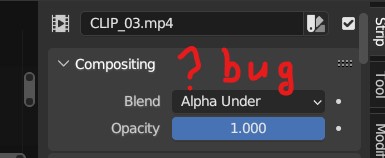
I tried to set the blending mode to ALPHA UNDER, which should put the video under the 3d, but it still prevents the 3d from rendering. (which might be a bug.)

6 Comments
I don't understand how this is a workaround here. To me it sounds like a missusage more than anything?
In Blender it's done by putting an audio track in the VSE and importing the frame sequence as reference. It's annoying to use if you need to change their timing, but manageable (and again, ideally it's the pipeline's job to do that, not the artist). Maybe it would be nice here to give support of audio tracks in reference objects to make it easier in that regard. This plus renderability as requested many times already would be more powerful.
Do you mean you "nearly always' have multiple audio mixed together?
There is no unique way to work of course, but in my professional experience: the only audio track we have is the final mixing, perhaps sometimes placeholders in the rare times that animation started before voice acting was finalized. But any reference we may bring in must be muted off, as we animate only on the final mixing.
But regardless, see the above : there are most likely better ways to do this in the first place. Ways that don't imply having another editor open to see a whole frame, better performances, flexibility, ...
For this to "make sense", it would require for the VSE to compose those video strip over the scene. Much like layers in Photosop: to put layer A on top of B, you need B to be there in the layer stack. But the 3D scene is nowhere in the VSE out of the box. Even though it may seem that way because that's what we see when we render without the VSE.
It's the job of the Scene strip. But you can't add the current scene in the VSE, so you have to make another one, and that's the annoying part IMHO: working with another scene "just" to be able to access one in the VSE.
That's two ways things could be improved for the same end result, and I think both are genuinely interesting and profiting more people.
Thanks, lots of valuable points. In my experience jpeg sequences have more negative impact on performances than a mp4 (that can have a proxy if it impacts perf at full rez), but I think image sequences do get cached bit by bit after some time playing them.
Makes sense to have the video ref in 3d, but it's nice to have it always fixed at the same place on your computer screen too.
For audio I didn't mean multiple audio tracks. And I didn't think about having another scene with VSE and scene clip, would technically work indeed.
For now I still think deleting and undoing is the "most" practical in my usecase. I recommended my animator to use a mp4 instead of jpeg because I was seeing like a 10fps boost doing that. But it might not be true on his end.
Could you move the video clips to another scene in the same video?
Could you explain a bit more what you're trying to accomplish? Why doesn't Render – Render Audio... work for you?
ok well the best is instead to do a viewport render, that don't care if there's a video in the VSE, you just have to re-enable all collections you use for render. but might be handier than re-importing the video each time you forget to ctrl+z.
Just to bump this, It's still making me risk having to re-import a video reference if I forget to Ctrl+Z after a anim-check render.
Jpeg sequences are really a no-go because incompatible with 24fps playback as opposed to mp4, and I really need to render with sound from the sequencer as it's dialogue / lipsynch.
Currently we cannot have both, audio and video references, as if we tick sequencer to have the audio, it does not render the 3d Scene, only sequencer. It only renders the 3d scene if we delete any video clip in any track, wich does not make sense, as if the videos are hidden, inactive, it should give the same effect as deleting them: Rendering the 3d scene.