
Distance Shader in Cycles (like Arnold/Redshift)
Cycles could really use a distance shader. The shader computes distance to the nearest vertex of a target object. It works like AO, just limited to one object. Image from Arnold's docs.
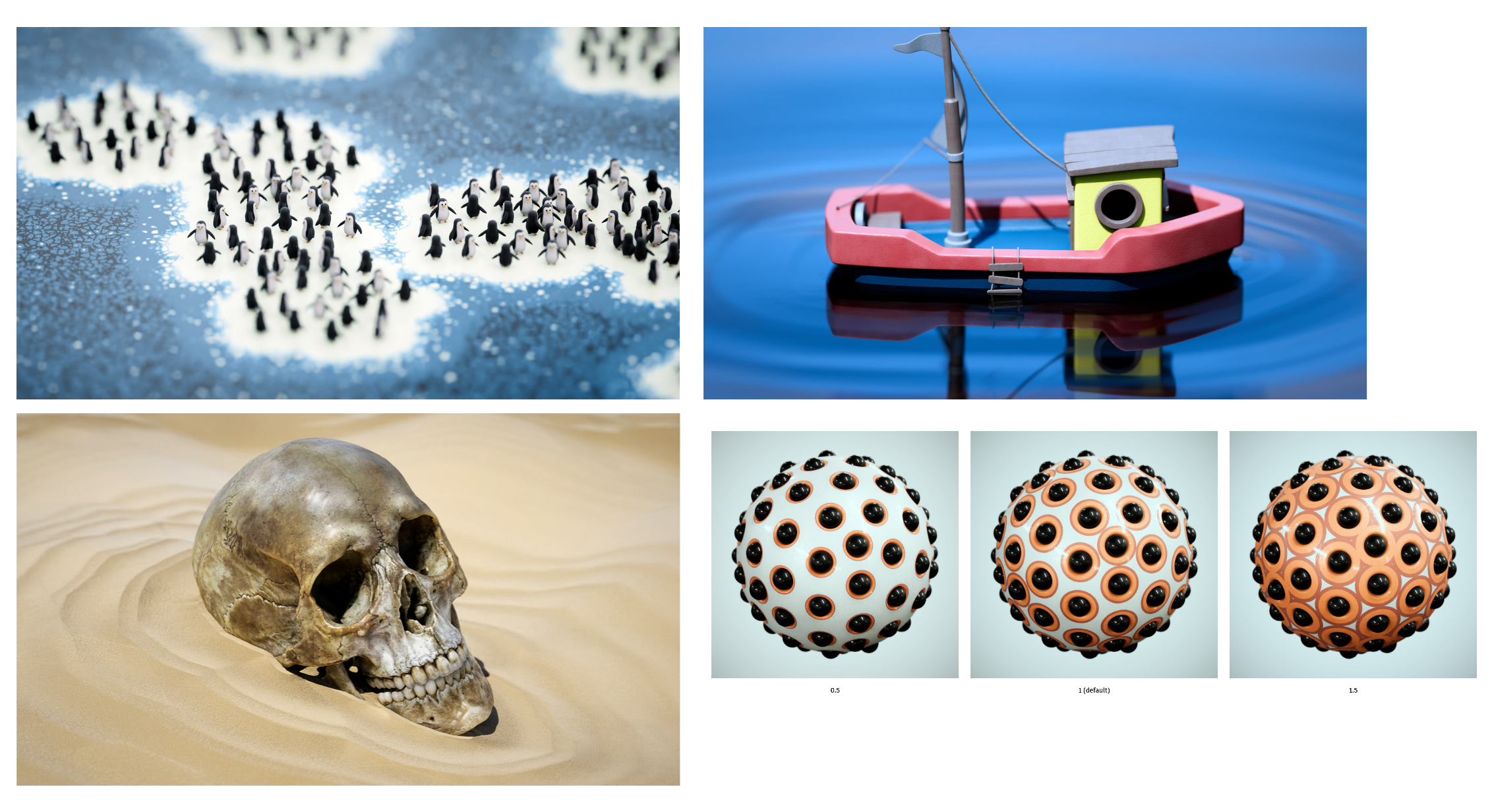
Cycles could really use a distance shader. The shader computes distance to the nearest vertex of a target object. It works like AO, just limited to one object. Image from Arnold's docs.
8 Comments
It doesn't take much to get distance effects in shaders. If you want only the object location's distance, all it takes is this:
And for the actual object's shape, the AO node does a great job usually:
And I bet we can do a lot more with Geo Nodes, but I am no expert in these.
What would a dedicated Distance node would bring to the table?
Perhaps being able to target specific objects or collections, and more controls on the distance and gradient ?
Well, I know and use all those tricks. What it does is - you can shade a plane that’s only 4 verts (so the GN way won’t work) using distance to vertices of one chosen object from many possible nearby objects (AO will sample distance to all objects). There is no reason to NOT have a distance node, if only as a mode for AO or whatever. It’d be immensely usable for motion graphics.
I'd provide a visual example but I've no idea how to attach an image in a comment.
I didn't say there shouldn't be a distance node ;)
This site supports a bit of markdown, so to put pictures anywhere you need to upload it somewhere (i use imgur), copy the url of the picture, and insert it using the markdown code
Out of curiosity: what's the add-on with the icons in the viewport?
Okay, so here is a visual example vs a screenshot of a recent demo from Redshift... so it turns out I can't event reproduce the fine stepped texture using the AO node - let alone having it only target a single object - the white torus. The only way would be to have a fairly dense geo and use GN. This is, however, a brute force solution.
@Hatrutsu
Pullusb/storytools: Blender addon - Set of tool for storyboarding in Blender
This distance shader shouldn't just be distance from some other named object (though that's useful too), I also want distance from the edge of the material itself - so think inner glow on a shape in Photoshop. Blender obviously already knows the edges of the material's applied area - it should be able to calculate the distance from that quite easily, one would think. 😉
Specific examples of ways I've used the distance node in Vray:
All from a simple render-time solution that is 100% solid across any kind of geometry you throw at it, including displacement. There's a lot of possibilities here. I consider this a pretty basic tool in a shading toolkit. And no, current solutions are not good enough: