
Improve the "Snap To: Face Project" Options (Offset Value for immediate 'floating' Mesh on Edit Mode)
Hey, folks;
I've thought this could be a nice implementation for Modelling in Blender; a bit niche, but intriguing... Actually, there might be lots of cool applications!
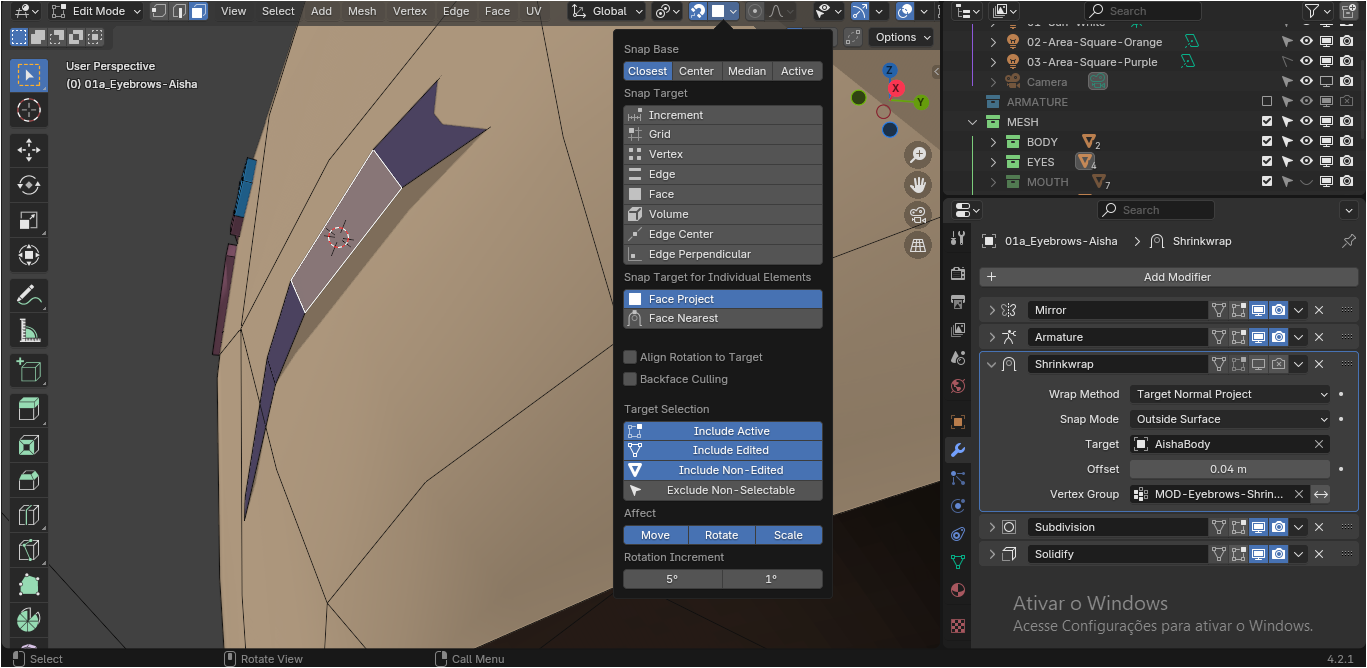
Improve "Snap To: Face Project" Options, by giving it an adjustable Value for "Offset" Distance (Offset: 0.0 m) in relation to what it is Snapping to (analogue to Shrinkwrap Modifier). I'm not sure about the following, but maybe, a Snap Mode (On Surface, Inside, Outside, etc.) might be included altogether? or maybe it wouldn't be necessary, since the Offset (Distance), from the Snapping elements, would be that adjustable Value ranging from Negative/0/Positive anyways?
By the way, such proposed Option(s) would appear by default on the Snapping Context Menu.
Naturally, it won't substitute realtime effects (e.g., like the Shrinkwrap Modifier for Rigging), but it would provide an interesting feature for Mesh Editions (on Edit Mode), without the need of setting up any Object Modifiers for Edit Mode, which would, by the way, even require Applying in order to rootly affect the Base Mesh (on Edit Mode), that is, from the Rest Position of the Mesh Object. However, if the Snapping Options were improved, we would be able to make plenty of such Editions, right ahead!
So, what I'm proposing here, is Root/Base improvements to the Edit Mode, for its Snapping feature. I just have this single example here (Face Project), but I believe such implementation might be expanded to, mayhap, one or another, if not all, of the Snapping types.
Thanks for the attention! Hope you like the idea.
6 Comments
Offset for Face Project is a great idea. Retopo mode exists but you can't see modifiers (Subdiv, Solidify) in this mode. Sometimes you want to be able to model with these modifiers visible but without the mesh clipping through the reference mesh.
Hi; and thanks for supporting the idea! What do you mean by "Retopo mode"? is that some kind of special feature?
I guess on Edit Mode for Mesh Objects, there are many different setups involving realtime, stacking Object Modifers; sometimes, On Cage + Edit, sometimes just Edit... but in the end, there seem not to exist, as of yet, an ideal setup for best visualization and Workflow on the Meshes.
Retopology is an overlay that can be toggled in Edit Mode. It's under Shading in the Mesh Edit Mode dropdown in the 3D Viewport. It turns the mesh transparent, offsets it by a designated amount so it isn't hidden by the reference mesh and hides backfaces. It's very useful but doesn't show subdivision properly and doesn't show lighting on the mesh.
Sorry for delay, and thanks for the details! I've checked the feature you've mentioned, it's interesting (I never do Re-Topology, that's probably why I missed knowing about it before).
I ran into the same limitation while doing retopology work and ended up experimenting with a prototype add-on for it.
The idea was to allow snapping to a surface while maintaining an adjustable offset along the hit normal, with the offset being adjusted interactively using the mouse wheel during the move operation.
After working with it for a while, I found it surprisingly useful not only for retopology but also for placing details on complex surfaces.
I eventually discovered that integrating this behavior reliably with Blender's existing transform and snapping systems is much more difficult than it initially appears, which probably explains why this functionality is still missing.
So +1 from me. I think having a proper offset option built directly into Face Project / Face Nearest snapping would be very useful.
Offset for all snapping modes would definitely be very useful. Example: rolling a curve/rope manually around a branch, one needs to constantly move vertices away from the branch's surface, because of the lack of a snap offset option. Seldom needed option, but every time I do, it's really missing.