
VSE: Add "Time Elapsed/Remaining" info in the render window
I'll go straight to the point. The only way to access this information while rendering, is by mouse hover in the progress bar and look at the tooltip:
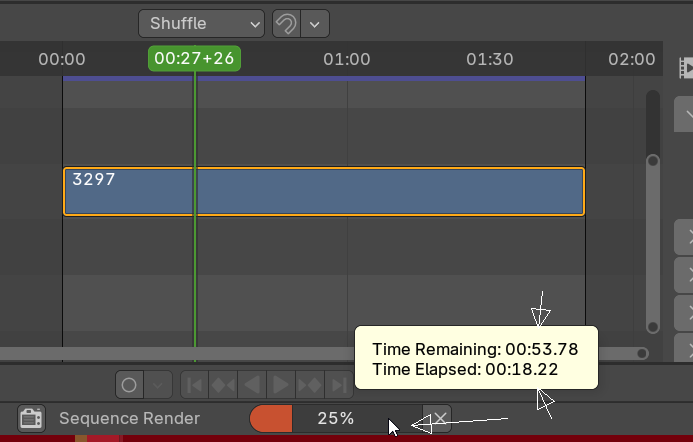
Yeah, super hidden.
So the request is to put this precious information where it makes sense, in the render window, along side the other related information:
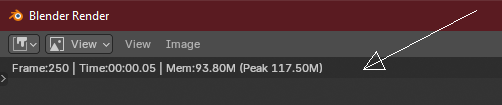
Easy to be monitored, as it should be ✌
5 Comments
+1 to the idea, -1 the proposal.
Advice for future proposals:
If a sentence doesn't really add anything other than attitude, better left out. Most people that can potentially help are volunteers on their free time, helps to be nice.
If you know of a similar functionality somewhere else, mention it, perhaps saying that'd better for consistency in the software not "where it makes sense", "as it should be ✌".
That being said, it's a good idea. Perhaps it should follow the same layout as Cycles.
that looks good. just lets not forget the elapsed time 👍
i wish we could turn on/off each separate piece of information that appears in that line. perhaps in the prefs or even overlays
The "Elapsed time" in Cycles is simply labeled "Time:"
Zero acknowledgement for the rest of the comment🤦♂️
i mean the "sections" like Frame, Last, Time, Mem, Peak etc
maybe its overkill, but would be nice to be able to toggle them on/off. sometimes all i want to see is the time and nothing else 🙂
yeah probably overkill 😂
Hello^^ I've opened a PR for this change here: projects.blender.org/blender/blender/pulls/129575