
Clutter from the left to the right
In Blender 2.7x we had clutter for years on the left. In Blender 2.80 this problem is solved. We have it now on the right.
There was a proposal for a solution on
blender.community/c/rightclickselect/xMcbbc/
but the replies over there: It's not a problem with Blender, it's a problem with addon developers. (Or other comments that doesn't lead to any solution but avoiding the issue).
So my request is not a predefined solution, but a request to solve the problem any way you like.
-
Having more workspaces and filter addons in each workspace is not really a solution. a) We will end up thinking "Where did I put that addon again", and b) it takes extra steps to remesh (addon) and then to model with another addon. (Switch between addons which happens very frequently).
-
Saying "The addon developers shouldn't make new tabs" doesn't lead to any solution. a) Addon developers are doing it and will keep on doing it. b)There will still be clutter if addon developers don't make new tabs.
-
Saying "Addon developer could place addons anywhere" doesn't lead to solution. a) you don't want to end up thinking "Where was that addon again"?
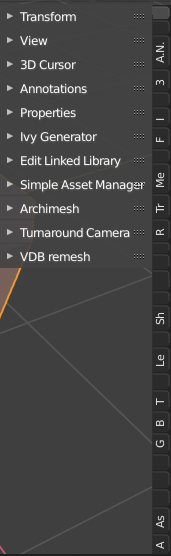
What you want is having addons listed at least the title of the addons readable. I don't know if you see the image, if not: it shows tabs on the right and most of them you can not even read the first letter of the addon's name.
9 Comments
Some addons let the user choose in which tab to be displayed in: It's an OK solution, but it lacks some user friendlyness. And it's still only on the addon's dev hands.
But IMHO there are some things to do:
You've stated the problem, but you've explicitly avoided providing any solution to the issue. What it sounds like you're asking for is improved tab management (as mentioned in the post you linked, this has nothing to do with add-ons and something more fundamental in Blender's UI design).
* @Jason van Gumster * Seems I follow the wrong format doing a proposal on right click select. Any recommendation, or is there a guideline available. my goal is to so see the clutter solved on the right. I will do one more attempt and if nothing construcive come out of it we are all waisting time and its better that I delete my account on right click select in that case.
* @robwesseling.rw * It's not so much about formatting, in your case. The idea is to propose specific, actionable ideas that Blender users can understand and Blender developers can implement.
In this example, it's as much about understanding the problem as it is understanding the solution. The problem, put simply, is that in Blender environments that have a lot of tabs, users can quickly get to the point where individual tabs are unreadable.
That tells us the problem, but we still need actionable solutions. If you have ideas, edit the original proposal and include them. If other people here in the discussion come up with interesting ideas, edit the original proposal and include them. Off the top of my head, here are some possibilities:
Of those three, the first is probably the most viable... combined with gentle urging from users to add-on developers that they should avoid creating new tabs if their add-on already fits an existing tab.
* @Jason van Gumster *
Thanks for the effort providing info I can use for further steps.
On Blenderartist.org there was someone recently who claimed to be able with the Pie Menu Editor addon to place addons in another tab. He will provide more info soon. Maybe that gives an entry to the solution (as well). So I will wait untill I can come with a more specific plan to solve the clutter-issue.
* @Jason van Gumster * Blndrusr, a user on Blenderartists.org showed me a video in this thread: blenderartists.org/t/list-of-addons-that-work-with-2-8/1132912/405 where he is able with the PIE menu editor addon to arrange addons in tabs.
That gives me the idea that the problem can be easily solved with some python code since the pie menu editor addon only works with python script. It gives me also the idea that the problem is not that complicated as we think.
Unfortunately I don't have the knowledge to work this idea further out, but glad that there is a solution. The only thing is that it won't ever be picked up I am afraid so that it can be a solution for all Blender users.
In case you have the knowledge how to work out this idea, be free. Maybe I come back if ever I have more experience.
* @Jason van Gumster * I want to delete my account here since I have the problem that I can't handle environments that are not constructive for me. (Could be my problem). Since I can't figure out how to delete my account here; Can I find it somewhere on Right Click Select how to do that? In case it is not possible to delete an account with it's data connected to that: I wonder if that is legal. As far as I know there must be an option to remove your own account and it's data.
* @none none * My controls over the community settings don't give me access to any individual user accounts. You may have to ping Pablo or Francesco about this.
* @Jason van Gumster * Hold on, my pants are falling down