
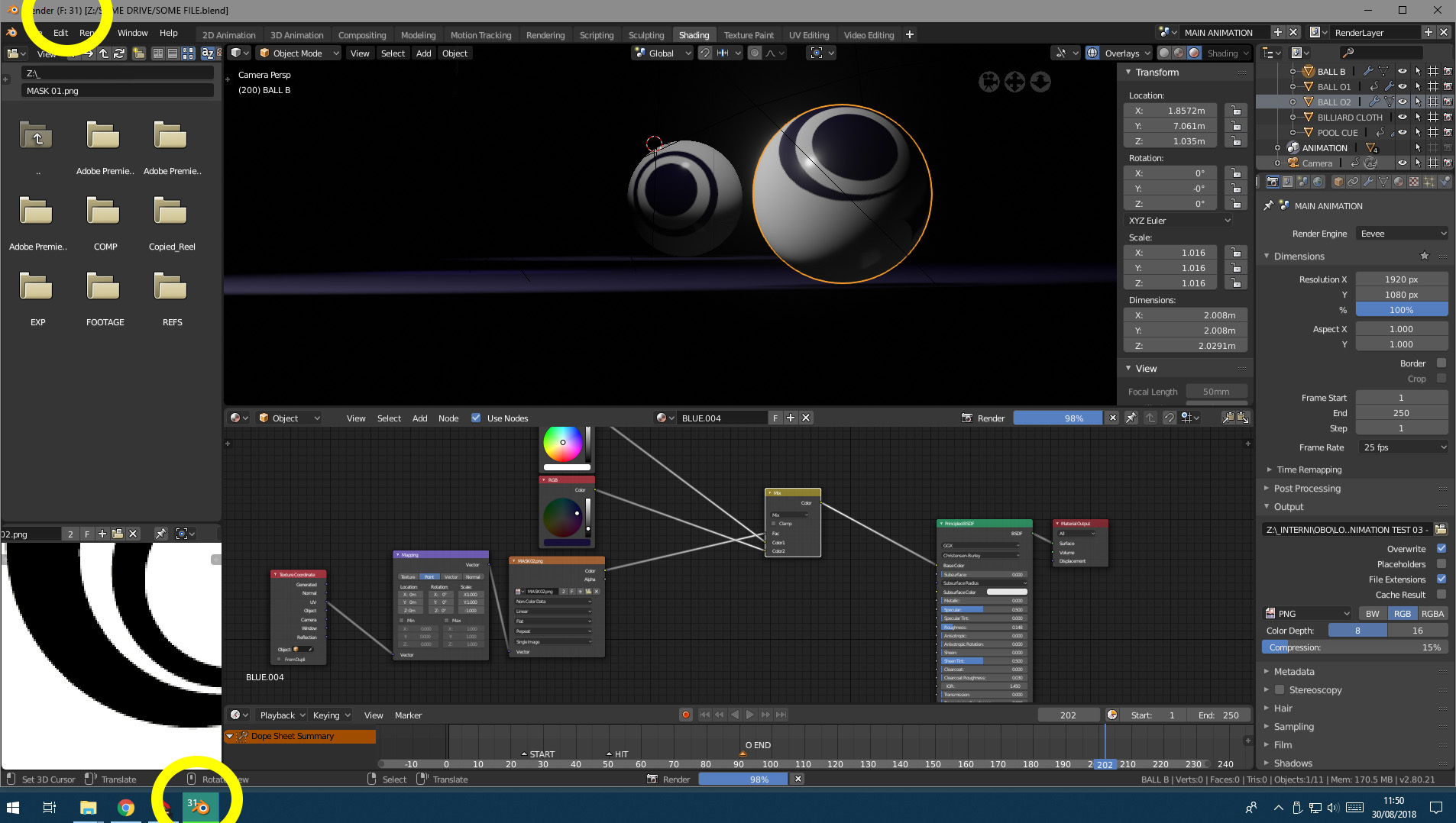
Current frame number in Titlebar/Icon during animation rendering
Here's the (admittedly quite simple) idea: what about displaying the current frame number on the Titlebar and/or on the system Icon during animation rendering? This way one could easily know a rough approximation on the current animation rendering process (since the progress bar only refers to the current frame completion)

13 Comments
Is there a proposal to get rid of the title-bar altogether. In Blender it is useless and just takes up space. Chrome, VS2019 integrated the min/max close buttons in the main interface and got rid of it.
* @registrirayme * If you launch Blender in fullscreen, you're already there.
Of course in some Linux window managers (like the one I use), you can arbitrarily remove window borders from any window you want.
* @Jason van Gumster * I don't want to use fullscreen for some reason.
I remember when Blender used to do this... I think. Can someone check me on this?
Before 2.5 releases?
Yeah my point was mostly related to quick tests, especially on Eevee. I can't really see myself opening a command line version of blender to run some quick and dirty renders. At the same time, for runs of 10 mins or less, if I could minimize blender and still keep an eye on how much is done, I could better manage other activities
I was going to suggest the bottom right corner where all the info is but as you meant while rendering maybe it would be better at the top. Why not have it in the same progress bar? Something like 45% / F125
@luisburdallo: Why not using batch render? It's even faster and you see what you need.
@graphicgladiatorchris: Not sure what you mean. Is that an addon or something?
@luisburdallo: You can start blender in the background by using the command line functions. In this way you can render several files in a row and see the current rendered frame. Additionally it renders faster then loading the whole program. See here for docs: docs.blender.org/manual/en/dev/advanced/command_line/arguments.html
I know it doesn't show the current frame if minimised in the taskbar, but it's still handy.
@graphicgladiatorchris: Ok. Maybe a workaround but I guess the proposal would be way better.
@luisburdallo: Not really. Blender actually renders faster when it doesn't have to draw/update the interface. If you're rendering an animation of any sizable length, doing it from the command line is really the best way to go.
@Jason van Gumster: Not everyone feel confortable using the command line. I already knew that and I have rendered sometimes using the command line but I guess the proposal is about having a visual reference while Blender is open. That's what I meant when saying "better". From a pure UI point of view.
@luisburdallo: A small note: I need a visual reference too, like you and maybe everyone. But I do it with a very low samples amount or with several test renders. Later then I use the command line, because it saves time.