
Camera with proper Aperture settings
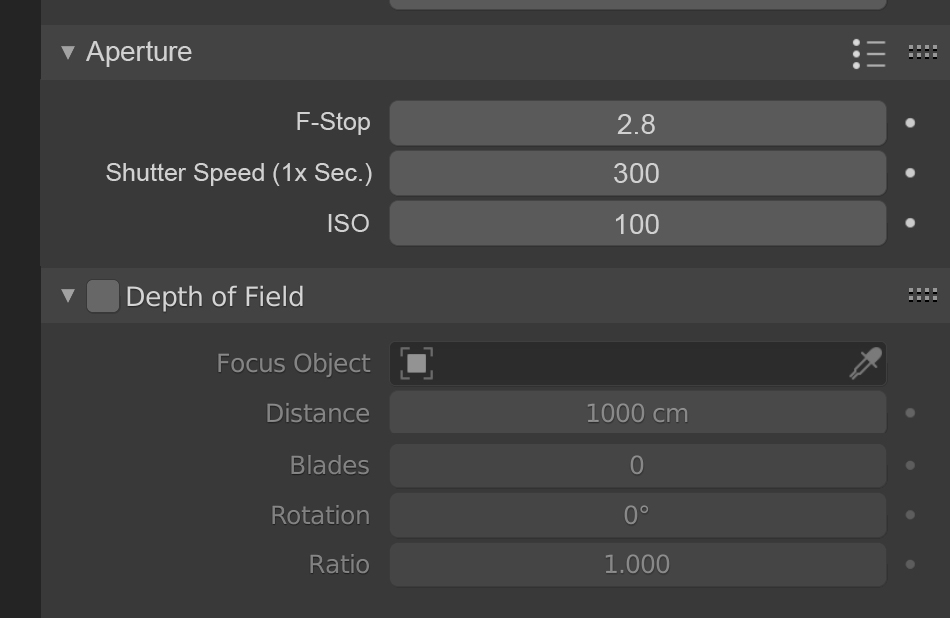
Currently the camera in Blender has no physical properties besides the F-Stop, which by the way is activated only with Depth of Field, leaving most of the "exposure" setting to the intensity of lights and/or values of Color Management. For a proper production workflow, I propose to add a new menu called Aperture (and remove the submenu of DOF with the same name), move F-Stop to this menu and add Shutter Speed and ISO properties. I know there are add-ons like Photographer and Real Camera, but the problem with them is that changing their properties of ISO or shutter speed what really does is changing the Gamma and Exposure parameters in Color Management, which is not ideal especially for later compositing and/or matching with film footage.
6 Comments
I personally like the idea of having real life camera behaviors but only if its an option like an "advanced" checkbox.
Terms like "ISO" or "Shutter Speed" and what these parameters actually do arent really obvious for uninitiated people or beginners. So still having a way to use simple camera settings like we currently have is, to me, a good thing that we should keep.
I suggested the exact same thing not long ago, and didn't get much response. Glad to see it has this time though.
There is an addon called Photographer, it offers the settings of a real camera and the including F stop, shutter speed and iso, and all three of them influences the exposure, shutter speed also influences the motion blur. Photographer 2 (for free) has the function I mentioned above, Photographer 3 and 4 are not for free but they have more advanced features like physical light units such as Luman and Candela. You can check it out.
This is Photographer 2 (for free): gumroad.com/chafouin
This is Photographer 3 (8$): gumroad.com/chafouin
This is Photographer 4 (14$): gumroad.com/chafouin
* @EaryChow * Read the last part of the paragraph
* @slowk1d * I don't get it, the whole point of having real camera settings is just for them to influence the overall exposure. What's the point of having these settings if they don't do anything to the exposure? Also most of the time, compositing and editing is not done at the same project file as the 3D scene, if you are doing it this way, you should change your workflow.
* @slowk1d * Despite that, Photographer addon can still be ideal since there is an "exposure mode", which means you give it one exposure number and no matter what else you change, the exposure would stay the same. Actually I think that "exposure mode" is the default mode, instead of the manual mode.