
A small suggestion to improve the 3d gizmo’s usability.
since we lost these settings from 2.79 i suggest better improvements.

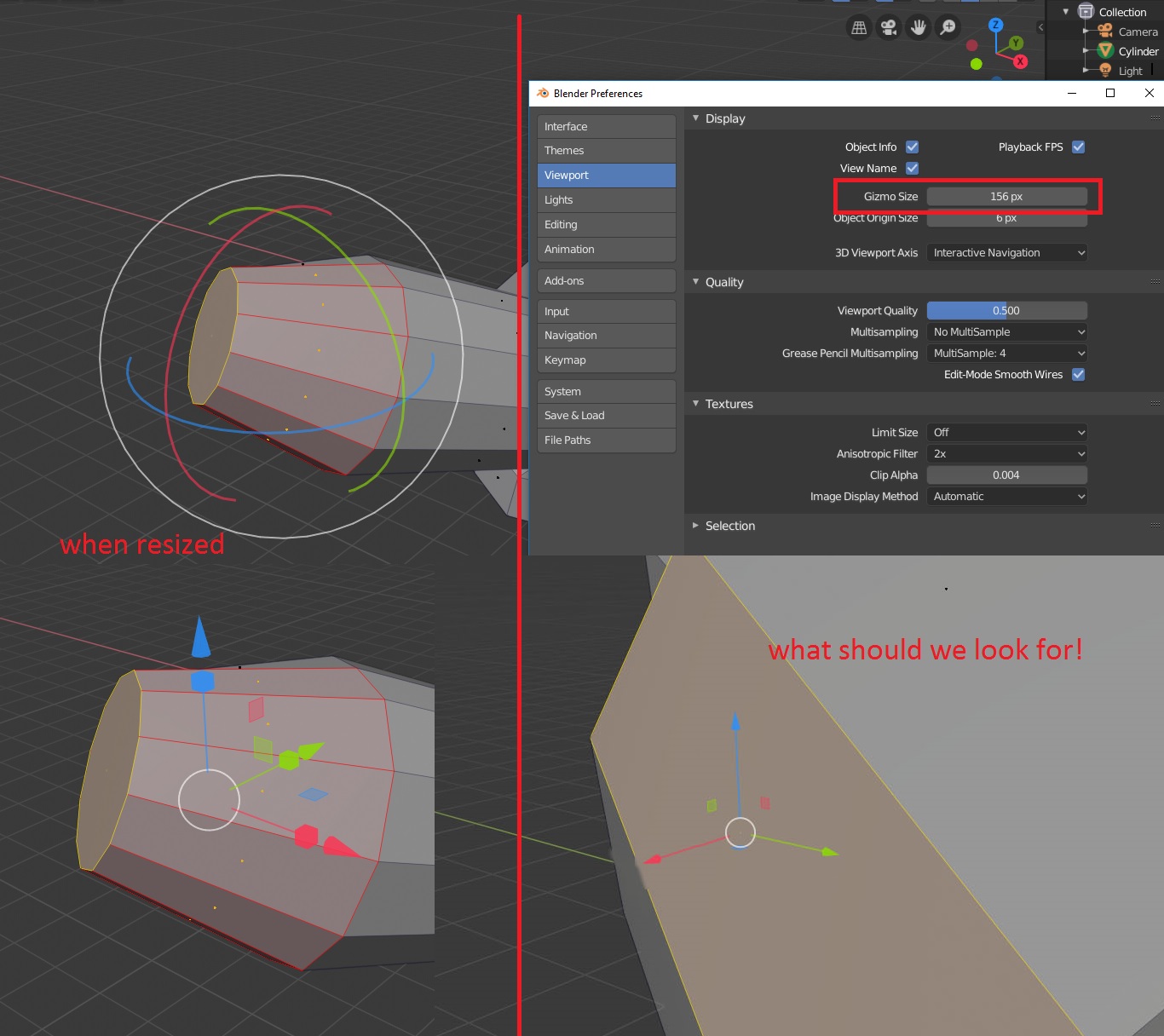
as the image shows ,reszing the gizmos scales them uniformly which is not a desirable result…u may ask, why do you want to resize in the first place?
my answer, is the rotation gizmo in particular is too small to work comfortably with, also having problems to grab the axes…it’s frustrating and infuriating. the default size is not helpful at all…but when u increase the size of the gizmo, it becomes much more usable but causes other gizmos to scale too big.
what should we look for is the result in the bottom right corner, so they don’t scale their endings but rather just expand the axes…a faster workflow is to give the possibility to bind the resizing to hotkeys so we can change it on the fly and not force the users to go to the preferences editor…thank you.
3 Comments
In maya there is a keyboard shortcut to resize the gizmos individually and it does only extend the length of the axis lines without increasing the arrows. I like it like that.
Link
A snapping element the vector graphics editors use like Inkscape can help make it more easy to navigate even if the size is not too big because the mouse pointer will be more sensitive to the points of the gizmo. Small indicators in the snapping point will also be available.