
Playback Speed Setting for the Video Editor
I made a YouTube video about this feature request: youtube.com/watch
I edit long format video tutorials with Blender, and a feature that would greatly speed up my video editing workflow, would be an option to control the playback speed on the timeline or in the sequencer.
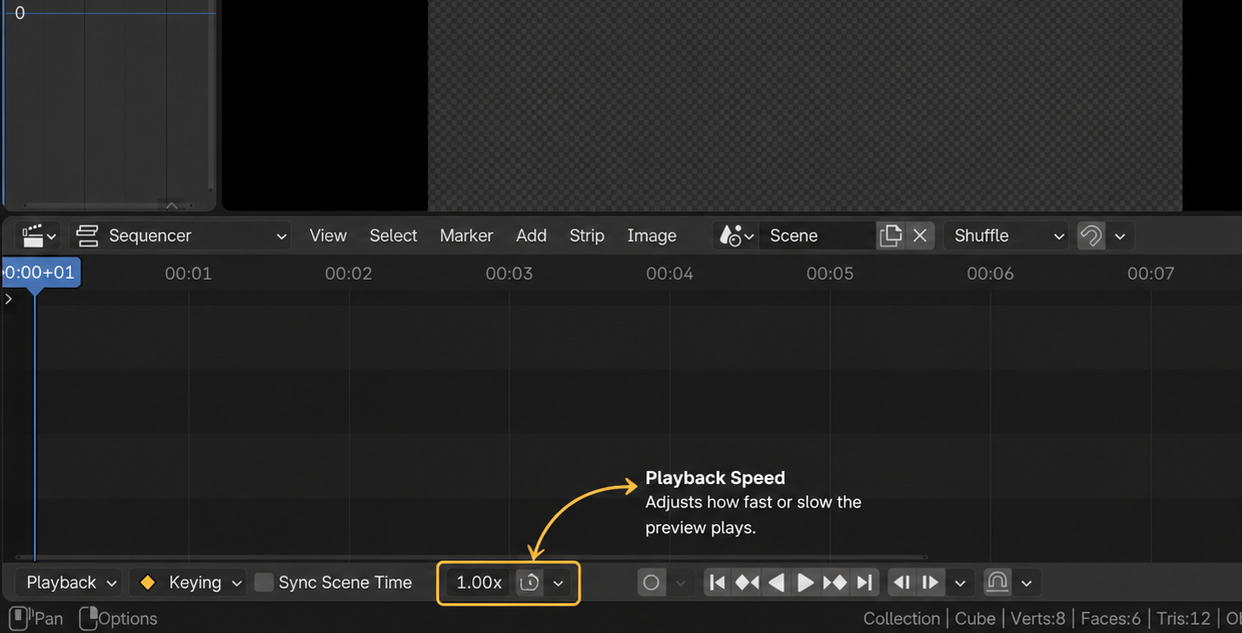
It could just be some simple buttons, like in YouTube's video player: 0.25× 0.5× 1× 1.5× 2× Or it could have a percentage bar.
I used Chat GPT to generate the attached image, but the setting doesn't have to be this visible on the timeline, it could be hidden in one of the timeline drop down menus or in the sequencer only.
The audio would also need to speed up, just like if you are watching a video in VLC or YouTube at a high speed, where it speeds up the audio without making everything high pitched.
This would really speed up my video editing workflow, as I have to watch through hours of my video content and edit out mistakes and pauses.
11 Comments
I agree with this request. This is pretty standard in all video and audio editors nowadays.
Thanks 👍
I'd argue it is useful outside of the VSE too. it would be nice to have it in any playback controls.
Yeah I'd really like to see this as an added feature!
That should be assigned to multiple presses at j,k,l - as it is industry standard.
I think the add-on is ready to test ! github.com/Dinesh0N/B-Playback-Tools
Thank you! I will try it out!
Hey, thanks for making this addon. I just tried it out and it works really well! I will have to test it and use it more to see if I find any glitches or bugs, but so far it seems to be working great! I will totally be using this addon for my future video editing!
Hey I submitted a bug on your Github page. Just wondering if you saw it yet.
🙂I wish you success
Thanks 👍