
Add Grease Pencil Layers option to Sort Elements node
Currently, there is no clear-cut way to order grease pencil layers in geometry nodes.
Quite often when one wants to perform a geometry nodes operation on a specific layer of a grease pencil object, one has to separate it from the rest of the geometry with a Delete Geometry node and join the separate components back together with the Join Geometry node. If the modified layer was in the middle of the layer stack, theres no way to get it back to its original position in the layer stack.
If the Sort Elements node had an option for sorting GP layers, one could store the original layer indices as an attribute and use them to sort the layers back to their original order after using the Join Geometries node.
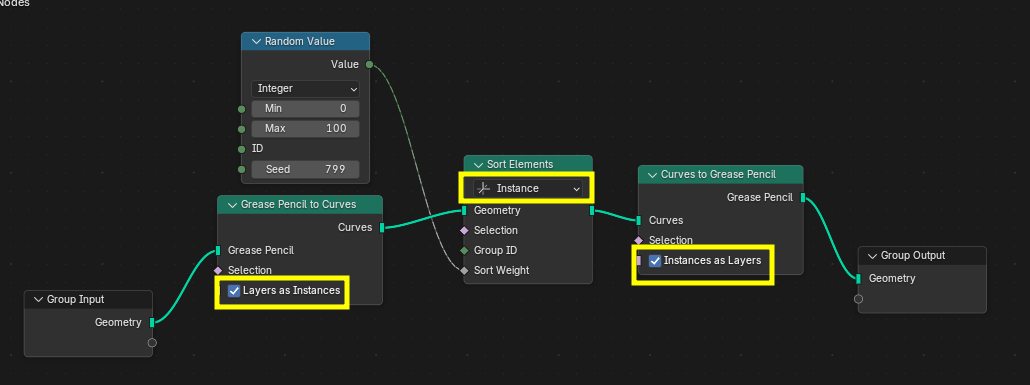
EDIT: I figured out that there is actually way to order GP layers.
Though with this method, the usual GP-Curves-GP conversion loss of some attributes applies.
1 Comment
Interesting workaround, but the lack of access to so many grease pencil attributes makes later retrieving or modifying these lost attributes impossible.