
LoopCut: mark multiple cuts before committing
LoopCut: mark multiple cuts before committing
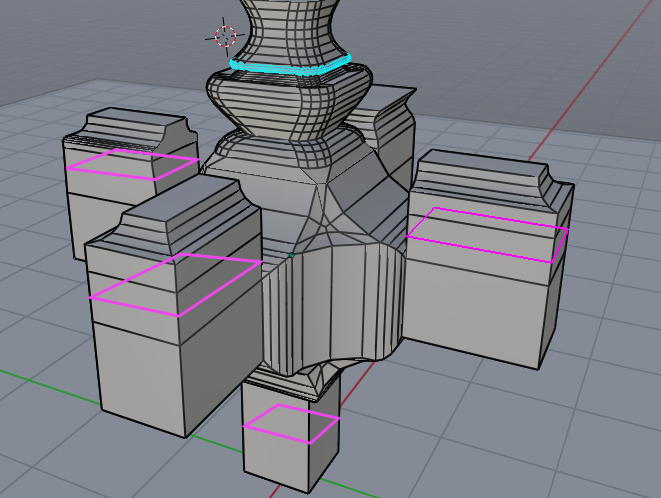
There are many cases where we need to assign multiple loop cut at the same time especially to add segments with a certain precision and to speed up modeling times.
I suggest adding the possibility to press the shift key to assign more loopcuts at one time (I hope it’s a not too complicated feature to add, it looks like something powerful without too much effort)
same userfull comments from here: devtalk.blender.org/t/suggestion-press-shift-for-add-multiple-loopcut-at-one-time/2584/5
Znio.G
I think what it will be useful for is if you have something like chandelier and you want to add a precise cuts on different parts then adjust all cuts parameters simultaneously after ur model is already finished…it gives you more control than a single cut for each side.
nokipaike
Exact, for all those types of objects that have kaleidoscopic shapes but also for other objects in general
nokipaike
Exactly, so I can position more “loopcut’s edge’s” more precisely at the same time and add edges and so on with high precision and fast.
Something similar already happens in the bevel tool
3 Comments
If I have to make a chandelier, my first thing to do would be to use a mirror modifier or circular array modifier so I handle only one pattern.
@loic.dautry:
of course ... you could ... it's a method ... but you will not always create only candelier ... and there will be times when the mirror and the array do not save you
Seems something that would improve many workflows ,sometimes you just loopcut without knowing how it wil lend up ,this would fix that and have it just be a very Controlled environment