
Improvements to the 3d Manipulators for better use.
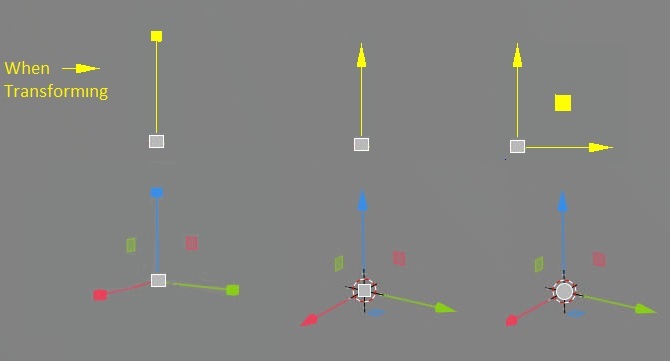
i feel with the addition of two axes constraints squares to the 3d gizmos the center circle is too big and in some angles it overlaps with those squares/axes making it hard to use, i know they made it big so it encompasses the 3d cursor...etc, my proposal is to make it smaller than the 3d cursor or turnit into a square like in the mockup...also when transformaing which will make it simpler and easy to use , righ now it's sensitive and cumbersome when trying to follow the dashed line.... of course this is just for the 3d manipulators & the shortcuts can remain the same so pro-uers won't complain about them changing.

9 Comments
Yea i need it. Manipulator should be similar to maya because it is beautiful. that circle blender has is awkward
I don`t feel that blinking gizmo and color is better for my eyes. Also disapperaing gizmo leaves more visibility of mesh. Long axis line is well noticeable
* @ Vyacheslav *what blinking gizmo & colour?? compared to what we have right now which is 1D infinte line to just a small arrow that indicates the direction they can keep the RGB Axis colours if they want to, this is just a mock-up, even the rotate tool in 2.80 is half finished when the axis shows the rotation ring along the 1D axis which is annoying and not helpful for the animatiors....................anyway there is already a task to tackle this but probably in 2.81 and on.
I made a video of how it works in BoxCutter add-on youtu.be/icQ9A6BD6k4
Link
there are too many cases in which they get in the way while doing your selections. The Move one from examples if you want to select a series of edges along aloop chances are that one of the axis will overlay the next edge you want to select.
* @Orphydian * what gets in the way?? the axes or the constraints squares..my proposal is about the center circle to make it less overlapping with the axes and easy to use....also when u transform you can't do selection at the same time, it's more for better visual feedback, but if you are talking about selection underneath the manipulators then that's a known issue and they are working on it -> developer.blender.org/T63996
* @zedkorp * in this particular case the axes. I can select while having the move tool active, what do you want to say ? Alos that report is marked as solved, and I dont think its like that.
* @Orphydian * there is a difference between selecting/transforming and activating a tool, the task was accediently closed now it's normal priority which will solve the problem to select/extend behind the axes , i thought u meant this since u said "many cases in which the axes get in the way while doing selection" :)