
Alpha Channel
I would love to get a Alpha Channel for Background / Foreground separation- independent from being applied.
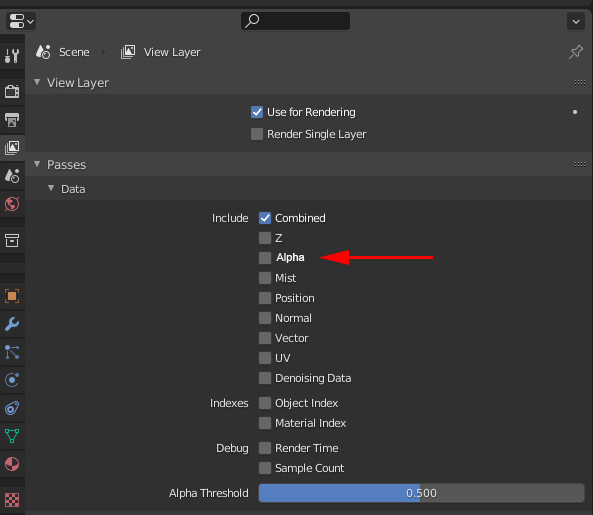
Or Better:
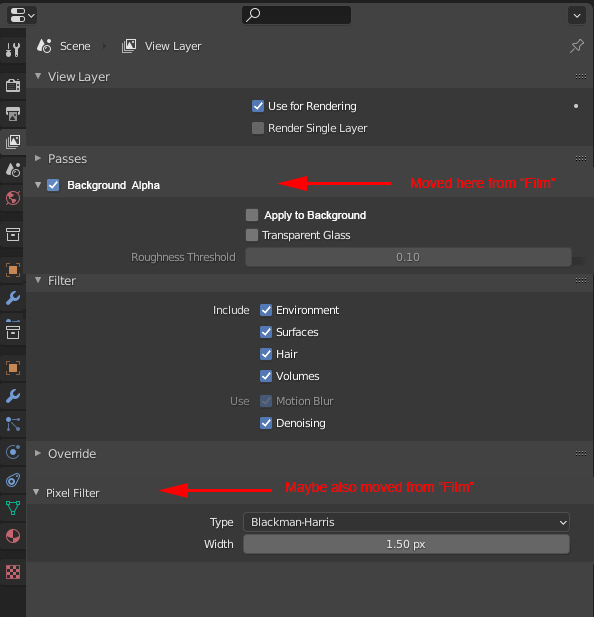
As the Film/Transparent Section is still a miracle to me (why to put together the Pixel Filter, Exposure, and Bg Transparency settings?)
maybe these settings could merge into other sections of the UI?
At least I would love to have the Alpha/transparency stuff close to the Render Passes in the view Layer Folder. eg.:
6 Comments
You can use exr multylayer and cryptomate to isolate any object or material after render in post. Very handy.
I am not sure what you are looking for.
If you are looking for an actual alpha that is interpreted as transparency, then enabling transparency in the Film panel is exactly that.
If you need a black and white render pass that allows you to isolate the scene world, then the Environment pass is what you need.
Or am I missing something ?
I Just need the Alpha. Environment pass has no Alpha (afaik), Transparency has an alpha but is applied, so i need a composite to merge the environment back again just to get the BG alpha. As the alpha is the most basic channel besides the RGB-beauty, it is quite cumbersome to get it.
Indeed the environment pass has no alpha, although you can use is to build it.
fairly complicated without need imho. when you look at posts like this: blenderartists.org/t/render-alpha-in-alpha-channel-in-blender-2-8/1172840
Yes that could be a nice addition.
I experimented a bit, you can enable both Transparent option in the Film panel AND the environment pass.
That way you can use the regular alpha output of your render, and you also have your environment in the compositing:
Though, the default render is still transparent until you do some changes via compositing nodes. But, you can do that in the meantime...